Best AI Models for Your Phone: A Size Guide
Choosing your first AI model can feel overwhelming. This guide cuts through the noise and shows you exactly which models work best for your device. The key insight: your phone's RAM is the main limiting factor.
The Simple Rule
Bigger models generally deliver smarter answers, but they need more RAM and storage. Think of it like this:
- 0.8B to 3B models: Fast, lightweight, good for quick questions and basic chat
- 4B to 9B models: The sweet spot for most phones, fast enough and smart enough
- 14B+ models: Desktop-class reasoning; only practical on 16GB+ phones
Not sure if a model will fit? Open TokForge's built-in model browser. It shows you exactly which models are compatible with your device and how much free RAM you have.
RAM Tier Table: Find Your Perfect Match
This is the key visual of this guide. Use your phone's RAM to find the column that matches you, then explore the recommended models:
| Your RAM | Best Model | Size | Speed* | Quality | Best For |
|---|---|---|---|---|---|
| 4GB | Qwen3.5 0.8B | 0.6GB | ~20+ tok/s | Basic | Simple Q&A, quick lookups |
| 6GB | Qwen3.5 2B | 1.4GB | ~15+ tok/s | Good | Everyday chat, writing help |
| 6GB | Llama 3.2 3B | 2.0GB | ~12+ tok/s | Good | Instruction following |
| 8GB | Qwen3.5 4B | 2.8GB | ~20 tok/s (flagship, measured) | Great | Best balance of speed & quality |
| 12GB | Qwen3 8B | 5.6GB | ~12 tok/s | Excellent | Rich conversations, roleplay |
| 12GB | Qwen3.5 9B | 5.5GB | ~10 tok/s | Excellent | Reasoning, creative writing |
| 16GB | Qwen3 14B | 9.7GB | ~8→16 tok/s (spec) | Near-desktop | Complex analysis, long context |
| 22GB+ | Qwen3.5 27B | 15.0GB | ~5 tok/s | Desktop-class | Maximum quality |
*Speed varies by chipset. Numbers are from Snapdragon and Dimensity flagship devices. Actual performance depends on your specific hardware and background app usage.
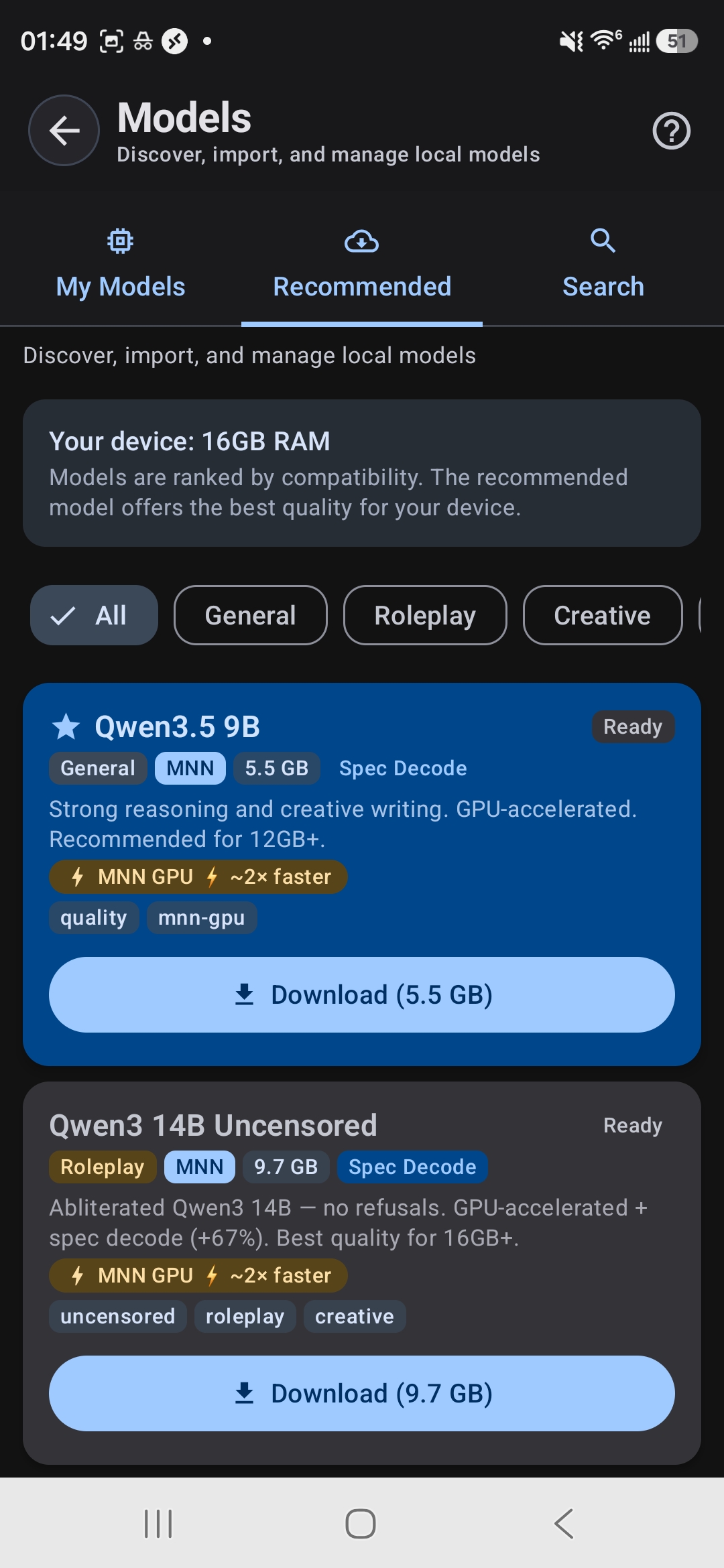
TokForge shows your RAM and recommends compatible models
How to Check Your RAM
Not sure how much RAM your phone has? It's easy:
- Open
Settings→About Phone→ look forRAMorMemory - Alternatively, open TokForge and go to the model browser. It will tell you exactly how much RAM you have and how much is currently free
Keep in mind: the free RAM available varies depending on what else is running. Close unnecessary apps before loading a large model for best performance.
MNN vs GGUF: Which Format Should You Choose?
You'll see models available in different formats. Here's what they mean:
MNN Format
- GPU-accelerated using Vulkan and OpenCL
- Typically faster on most Android devices
- TokForge's primary backend and recommended starting point
- Best for maximizing speed on mid-range to flagship phones
GGUF Format
- CPU-focused backend (llama.cpp compatible)
- Supports KleidiAI acceleration on newer ARM chips
- Wider model variety available
- Good fallback if a specific model isn't available in MNN
Rule of thumb: Start with MNN models for the best out-of-the-box performance. Try GGUF if you want a specific model that isn't available in MNN format.
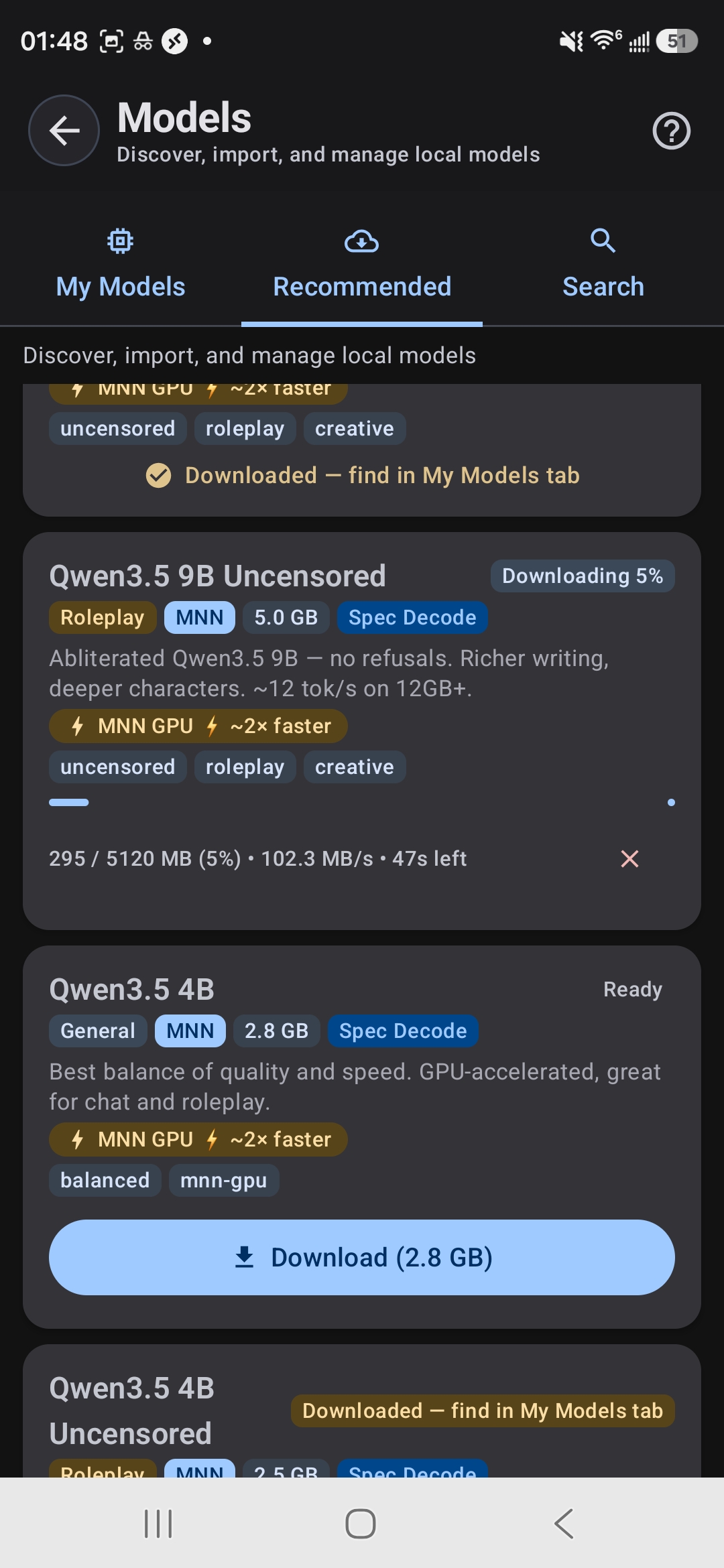
Download models directly in the app: no manual file management
Model Categories Explained
Different models are optimized for different tasks. Understanding the categories helps you pick the right tool:
General-Purpose Models
Balanced, good at everything. Examples: Qwen3.5 series, Llama 3.2. Use these if you want one model that does it all: chat, writing, Q&A, coding help.
Roleplay & Creative Models
Uncensored or "abliterated" models designed for character play, fiction writing, and creative exploration. Examples: Qwen3 Uncensored, Lumimaid, Stheno. These models have fewer guardrails and excel at creative, open-ended tasks.
Thinking & Reasoning Models
Chain-of-thought models that show their work and think through complex problems step-by-step. Examples: DeepSeek R1 Distill 7B, Phi-4 Mini Reasoning. Great for math, logic puzzles, and deep analysis.
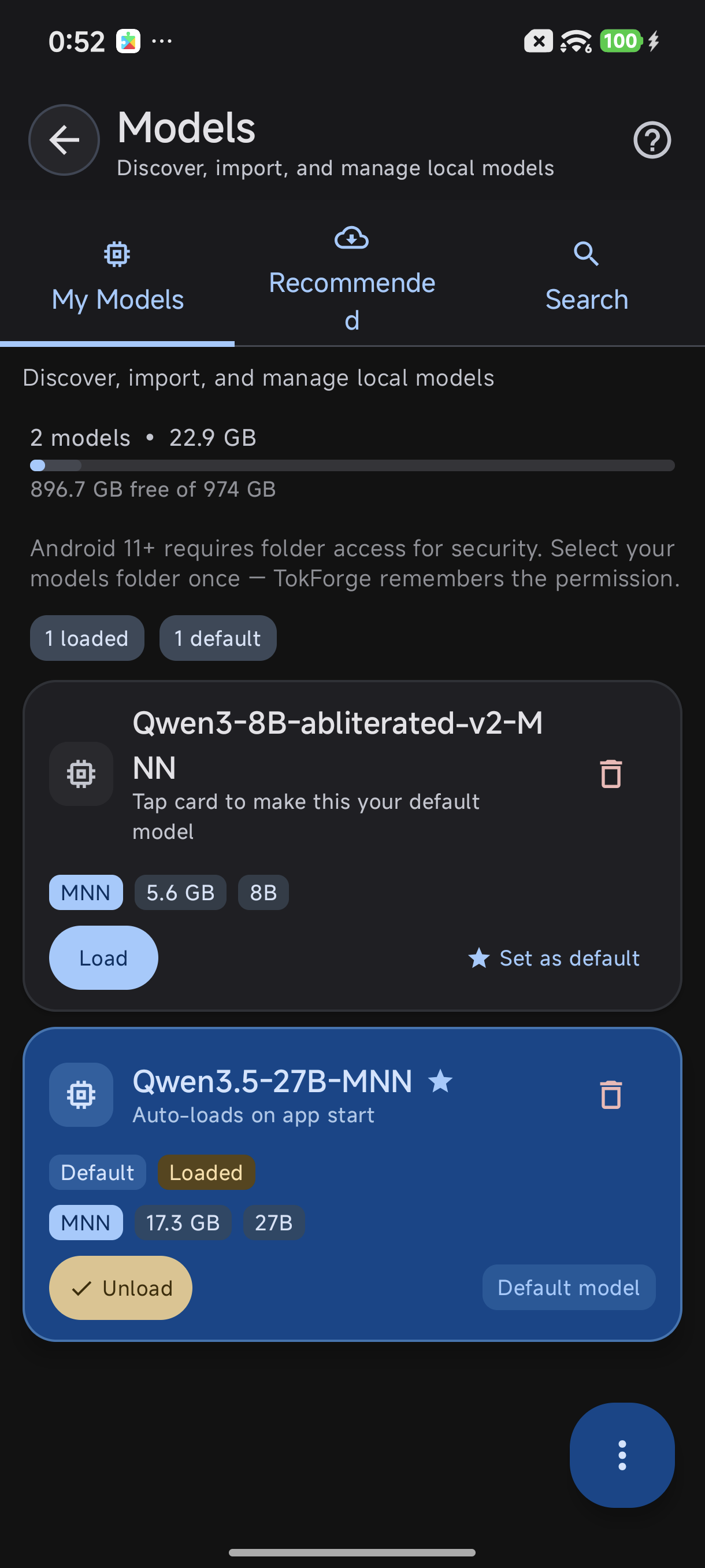
My Models tab: switch between downloaded models
Speed Boosters: Get More Out of Your Model
Modern optimization techniques can dramatically improve performance without upgrading your phone:
TurboQuant (TQ4)
An aggressive attention-cache (KV) quantization mode that shrinks the memory your conversation context uses while keeping most quality. It cuts context memory by up to about 83%, so long chats and bigger contexts fit on the same phone.
Speculative Decoding
Supported models can use speculative decoding, measured at +34% to +43% on chat workloads on our test devices. Predictions are verified by the main model, so quality stays intact.
GPU Acceleration
MNN models with GPU acceleration can be up to 3x faster than CPU-only inference on larger models (1.7B and up; on tiny models CPU often wins). Make sure you're using MNN format to take advantage of this.
Storage Management: Keep Your Phone Organized
Models range from 0.6GB to 15GB. You can have multiple models downloaded at once, but only one loads into RAM and runs at a time.
- Keep multiple models for different tasks: a fast 4B for chat, an 8B for quality, a reasoning model for complex work
- Switch between them instantly in TokForge's model browser
- Delete models you don't use from the Model Manager to free up storage
- Only the active model consumes RAM; downloaded models just take storage
Pro tip: Download a smaller model like Qwen3.5 2B as your everyday go-to, and a larger model for when you need deeper reasoning or creative writing.
Our Recommendations
Based on real-world testing across devices, here are the models we recommend for different use cases:
Best Starter Model
Qwen3.5 4B: Works on most 8GB+ phones, fast (roughly 20 tok/s on flagship chipsets in our benchmarks), and capable enough for everyday chat, writing, and research. This is the model we'd recommend if you're just getting started.
Best Quality Per GB
Qwen3.5 9B: The sweet spot for 12GB devices. It delivers excellent reasoning and creative writing without sacrificing speed. This is where most power users land.
Best for Roleplay
Qwen3 8B Uncensored: Fewer restrictions than the base model, excellent at character play, fiction, and creative exploration. Available on 12GB+ devices.
Best for Reasoning
DeepSeek R1 Distill 7B: A chain-of-thought specialist that excels at math, logic, and deep analysis. Watch it think through your hardest questions.
Ready to Get Started?
Download TokForge on Google Play and explore the model browser to see which models are compatible with your device right now.
Also check out our Offline AI Guide and AutoForge Guide for more advanced topics.
Questions? Here's More
What if my phone has less than 4GB RAM?
If your device has 3GB or less, consider using a cloud-based AI service or upgrading your phone. TokForge is optimized for 4GB and above. Very small models (512MB to 800MB) exist but are too limited for practical use.
Can I run two models at once?
No. Only one model can be loaded in RAM at a time. But switching between downloaded models is instant. Just select a new one in the model browser.
Do larger models always give better answers?
Larger usually means smarter, but not always better for your use case. A 4B model with good training data often beats a poorly-trained 14B. Qwen and Llama are our favorite architectures for phones because of their quality-to-size ratio.
What about battery drain?
Running AI models does use battery, but less than you might think. A 4B model running locally uses less power than streaming to the cloud (no network radio). Smaller, quantized models are more efficient. GPU acceleration can also save battery by offloading work from the CPU.
Can I use custom or fine-tuned models?
Yes, if you convert them to MNN or GGUF format. Advanced users can import models via TokForge's model manager. See our documentation for conversion tools.
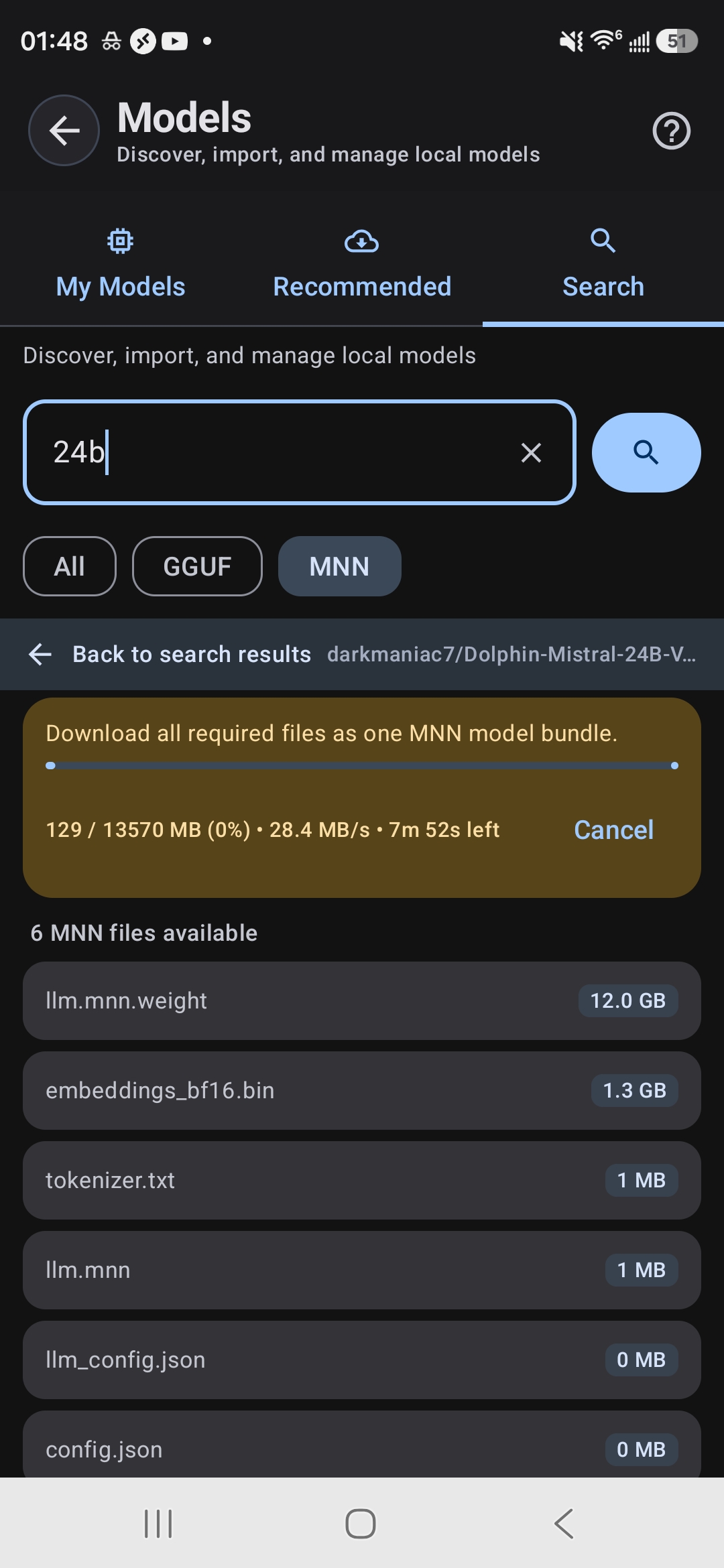
Search HuggingFace for any compatible model