TurboQuant Explained: 57 tok/s on Your Phone
Master aggressive GPU quantization to unlock blazing fast inference on mobile devices
What is TurboQuant?
TQ4 is an aggressive GPU quantization format exclusively available for the MNN backend. It's designed for performance enthusiasts who want to push their mobile devices to their absolute limits.
Think of TQ4 as a turbo mode for models that are already fast. It trades a small amount of output quality for massive speed gains on small language models (0.8B–4B parameters). TQ4 keeps model weights in a highly optimized, GPU-friendly format that modern mobile processors can crunch through in record time.
TQ4 is perfect for users who prioritize speed and are willing to accept subtle quality tradeoffs for everyday tasks like chat, brainstorming, and creative writing.
The Numbers: Speed vs Standard
Here's what TQ4 delivers in real-world benchmarks on flagship mobile devices (Snapdragon/Dimensity class):
| Model | Standard Speed | TQ4 Speed | Speedup |
|---|---|---|---|
| Qwen3.5 0.8B | ~20 tok/s | ~57 tok/s | 2.8x |
| Qwen3.5 2B | ~15 tok/s | ~40 tok/s | 2.7x |
| Qwen3.5 4B | ~12 tok/s | ~46 tok/s | 3.8x |
These numbers come from real devices. The 0.8B model, already blisteringly fast at 20 tok/s on standard settings, nearly triples its speed with TQ4. For context, 57 tokens per second is competitive with many desktop setups.
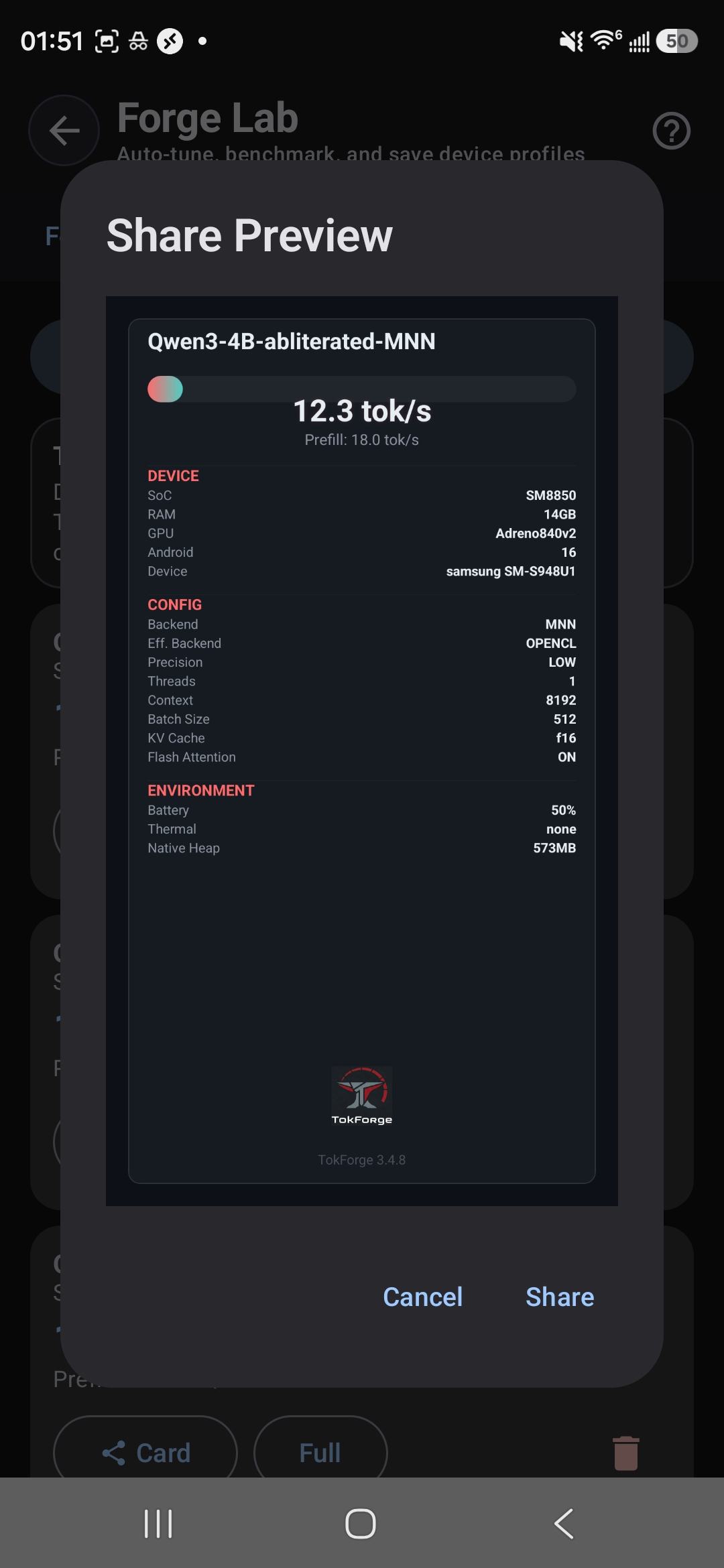
4B model benchmark — 12.3 tok/s with TQ4 on Galaxy S24
How It Works (Simplified)
Standard MNN models use balanced quantization—a middle-ground approach that preserves quality while reducing size and improving inference speed.
TQ4 takes a different approach: it pushes quantization more aggressively, keeping model weights in an even more compact, highly specialized GPU-friendly format. Modern mobile GPUs can process this format much faster than standard quantization, but there's a tradeoff.
TQ4 achieves its speedups by accepting slightly lower numerical precision. For everyday tasks, this is barely noticeable. For complex reasoning chains, you might see subtle differences.
The technical benefit: TQ4 reduces memory bandwidth requirements and allows the GPU to parallelize computation more effectively. The practical effect: responses stay coherent and helpful, but edge-case handling on hard problems isn't quite as sharp as a larger standard model.
When to Use TQ4
Best Use Cases
- Quick chat — Fast response times for casual conversation
- Brainstorming — Generate ideas and outlines rapidly
- Creative writing — Stories, prompts, and narrative content
- Code snippets — Simple functions and boilerplate generation
- Casual conversation — Everyday interaction without strict accuracy requirements
Less Ideal Use Cases
- Complex reasoning chains — Multi-step logic problems may lose precision
- Math problems — Numerical accuracy can be impacted
- Maximum-accuracy tasks — When precision is critical, use a larger standard model instead
Rule of thumb: If you need speed and can tolerate occasional slight loss of nuance, TQ4 is your friend. If you need uncompromising accuracy, stick with a larger standard model.
How to Enable TurboQuant
Enabling TQ4 is straightforward—no configuration or tweaking required:
- Open TokForge and navigate to Model Manager
- Browse available models and look for models with a TQ4 badge
- Download your chosen TQ4 model
- Start chatting—TQ4 activates automatically
That's it. No settings to adjust, no backend swaps needed. The app handles all the heavy lifting.
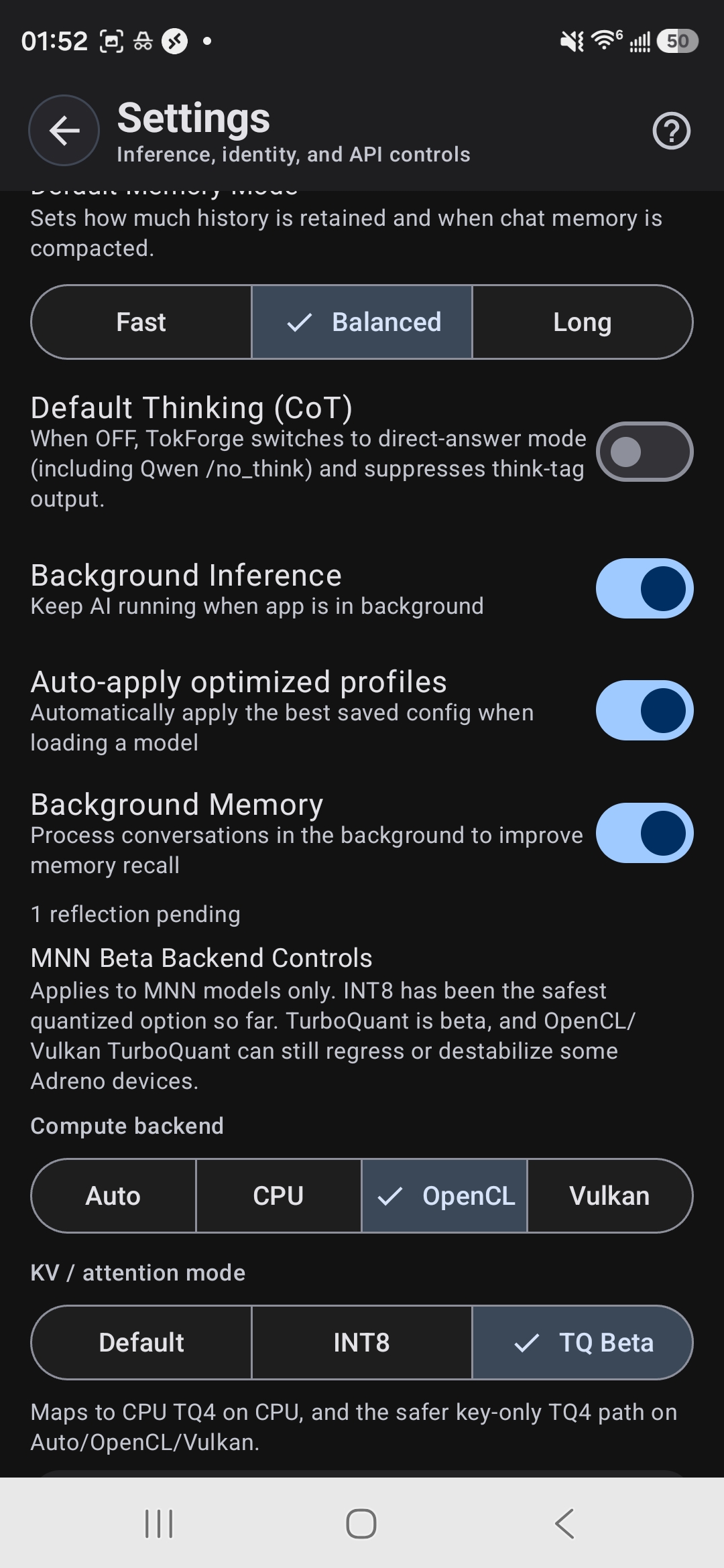
MNN Backend Controls — select TQ Beta for TurboQuant acceleration
Quality Comparison: Standard vs TQ4
Let's walk through a real-world example. Both responses come from the same prompt using the Qwen3.5 4B model—one standard, one TQ4.
Both responses are correct and coherent. The standard version is more technical and explores feedback mechanisms. The TQ4 version is simpler, more accessible—still accurate, just less detailed. For casual chat and learning, TQ4 performs admirably.
Best TQ4 Model Picks
For 8GB+ RAM Devices
Qwen3.5 4B TQ4 is the sweet spot. It delivers the fastest speedup (3.8x), produces the most capable responses, and fits comfortably on any modern flagship.
- Memory footprint: ~4.5 GB loaded
- Speed: ~46 tok/s
- Quality: Excellent for most tasks
- Best for: Users who want maximum speed without sacrificing too much capability
For 6GB RAM Devices
Qwen3.5 2B TQ4 is the recommended choice. Still incredibly fast, lighter on RAM, and handles general tasks beautifully.
- Memory footprint: ~2.5 GB loaded
- Speed: ~40 tok/s
- Quality: Strong for chat and creative tasks
- Best for: Users on mid-range devices or those who want to run multiple apps simultaneously
For Maximum Speed (All Devices)
Qwen3.5 0.8B TQ4 is the ultimate speedster at 57 tok/s. Ideal if speed is your absolute priority and you're okay with a smaller, less capable model.
- Memory footprint: ~1 GB loaded
- Speed: ~57 tok/s
- Quality: Good for simple tasks and quick responses
- Best for: Lightweight conversations and brainstorming
Ready to Experience TurboQuant?
Download TokForge on Google Play and unlock blazing-fast inference on your phone.
Key Takeaways
- TQ4 is aggressive quantization optimized for speed. It trades minimal quality for massive performance gains (2.7–3.8x faster).
- 57 tok/s on a 0.8B model is desktop-class speed. Even the larger TQ4 models push 40–46 tok/s.
- Quality is still excellent for everyday tasks—chat, creative writing, brainstorming, and code snippets are all perfect fits.
- No setup required—just download a TQ4 model and go. TokForge handles everything.
- Pick the right model for your device: 4B for 8GB+, 2B for 6GB, 0.8B for maximum speed.
Questions about TurboQuant? Check out the full documentation or dive into the other guides.