
Best AI Models for Your Phone: A Size Guide
Choosing your first AI model can feel overwhelming. This guide cuts through the noise and shows you exactly which models work best for your device. The key insight: your phone's RAM is the main limiting factor.
TokForge is free. Android is live on Google Play; iPhone and iPad are in public beta on TestFlight. No account, and it works with the network off once a model is downloaded.
Reading on a computer? Check which models fit your phone, or see real measured speeds on the phone-speed leaderboard.
The Simple Rule
Bigger models generally deliver smarter answers, but they need more RAM and storage. Think of it like this:
- 0.8B to 3B models: Fast, lightweight, good for quick questions and basic chat
- 4B to 9B models: The sweet spot for most phones, fast enough and smart enough
- 14B+ models: Desktop-class reasoning; only practical on 16GB+ phones. That includes the catalogue's largest entries, 35B mixture-of-experts models offered as abliterated builds
Not sure if a model will fit? Open TokForge's built-in model browser. It marks which models fit your phone's RAM.
RAM Tier Table: Find Your Perfect Match
This is the key visual of this guide. Use your phone's RAM to find the column that matches you, then explore the recommended models:
| Your RAM | Best Model | Size | Feel | Quality | Best For |
|---|---|---|---|---|---|
| 4GB | Qwen3.5 0.8B | 0.6GB | Near instant | Basic | Simple Q&A, quick lookups |
| 6GB | Qwen3.5 2B | 1.4GB | Faster than you read | Good | Everyday chat, writing help |
| 6GB | Llama 3.2 3B | 2.5GB | Faster than you read | Good | Instruction following |
| 8GB | Qwen3.5 4B | 2.8GB | Comfortable on a flagship | Great | Best balance of speed & quality |
| 12GB | Qwen3 8B abliterated | 5.6GB | Comfortable reading speed | Excellent | Rich conversations, roleplay |
| 12GB | Qwen3.5 9B | 6.8GB | Comfortable reading speed | Excellent | Reasoning, creative writing |
| 16GB | Qwen3 14B abliterated | 9.7GB | Steady, worth the wait | Near-desktop | Complex analysis, long context |
| 24GB | Qwen3.5 27B | 17.6GB | Slow but usable | Desktop-class | Maximum quality |
Download sizes are the values the shipping app uses, taken from its own catalogue in version 1.3.6.1 on Android. Where a model exists in more than one format the figure is for the build the app offers first. To check a specific model against your own handset, use the phone RAM calculator.
Speed varies by chipset, backend and app version, so this column describes how a model feels rather than freezing a number. For measured tokens per second on hardware like yours, see the phone-speed leaderboard.
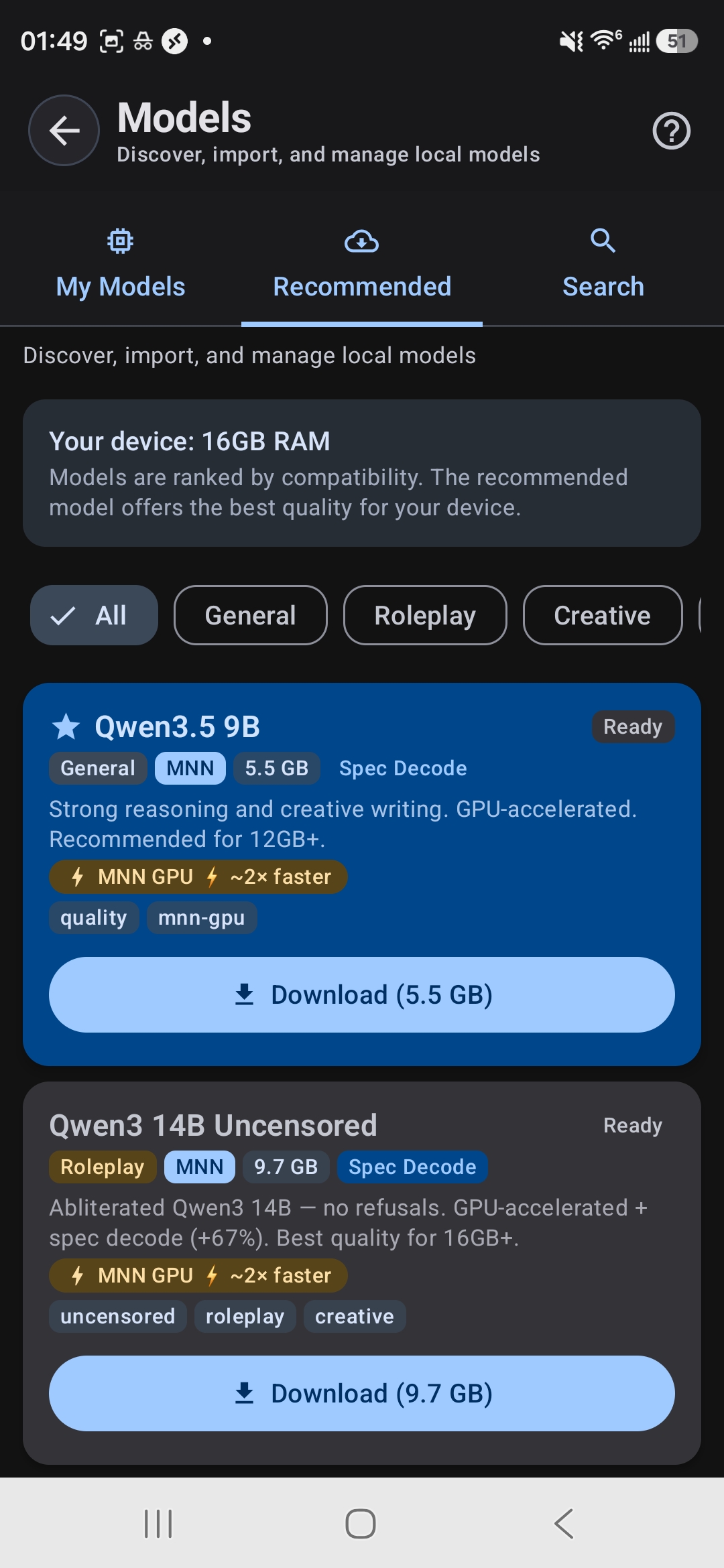
TokForge shows your RAM and recommends compatible models
How to Check Your RAM
Not sure how much RAM your phone has? It's easy:
- Open
Settings→About Phone→ look forRAMorMemory - Alternatively, open TokForge and go to the model browser. It shows your RAM and marks which models fit
Keep in mind: the free RAM available varies depending on what else is running. Close unnecessary apps before loading a large model for best performance.
MNN vs GGUF: Which Format Should You Choose?
You'll see models available in different formats. Here's what they mean:
MNN Format
- Runs on CPU, with OpenCL and Vulkan GPU paths depending on the phone
- TokForge's primary format on Android and the recommended starting point
- Needs a processor with the ARM dot-product instructions; older chips without them use GGUF
GGUF Format
- llama.cpp (GGUF) on CPU, with OpenCL and Vulkan GPU paths
- Supports KleidiAI acceleration on newer ARM chips
- Wider model variety available
- Good fallback if a specific model isn't available in MNN
Rule of thumb: Start with the MNN models the app recommends for your phone. Try GGUF if you want a specific model that isn't available in MNN format.
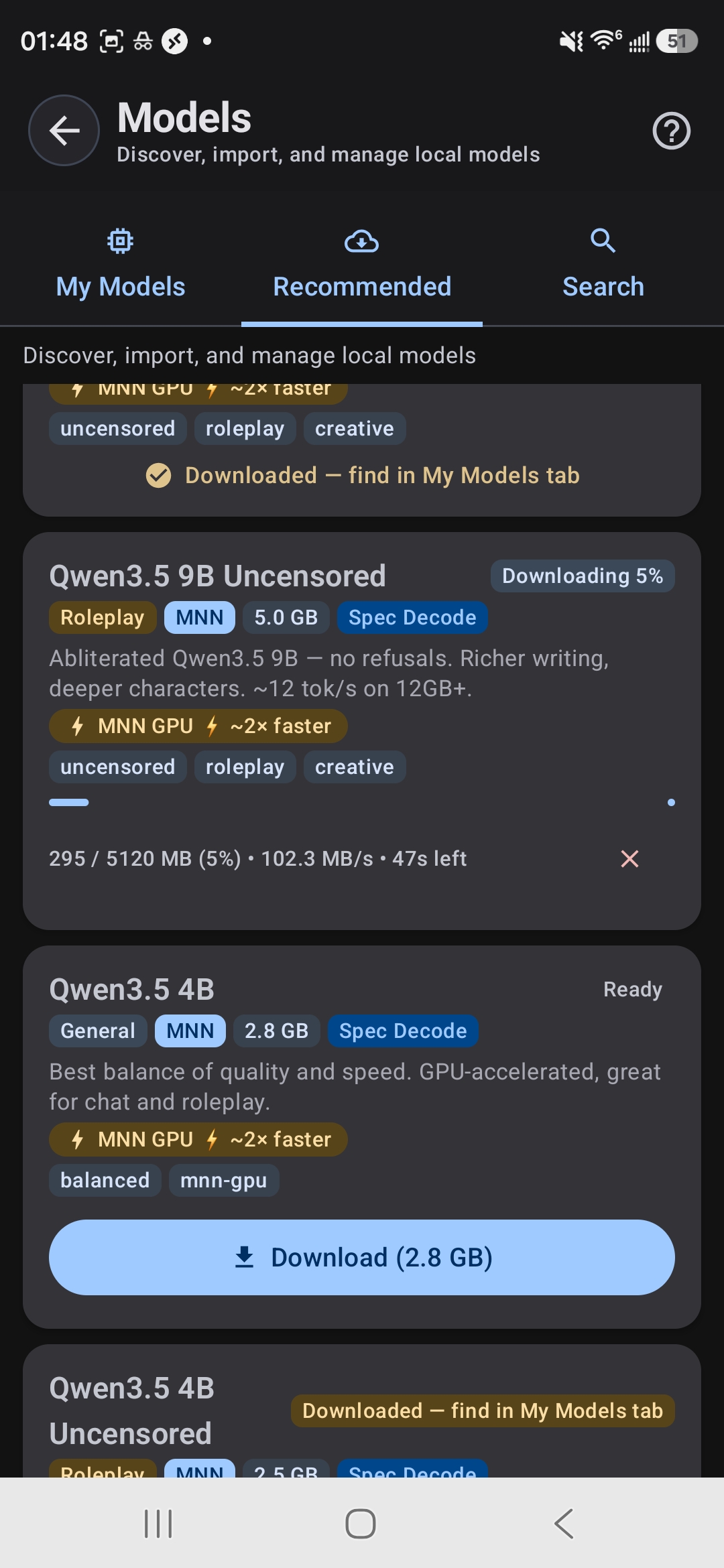
Download models directly in the app: no manual file management
Model Categories Explained
Different models are optimized for different tasks. Understanding the categories helps you pick the right tool:
General-Purpose Models
Balanced, good at everything. Examples: Qwen3.5 series, Llama 3.2. Use these if you want one model that does it all: chat, writing, Q&A, coding help.
Roleplay & Creative Models
Abliterated and roleplay-tuned models for character play, fiction writing and creative exploration. Examples: Qwen3 abliterated, Lumimaid, Stheno. They have fewer guardrails and hold up better in long open-ended scenes.
Thinking & Reasoning Models
Chain-of-thought models that show their work and think through complex problems step-by-step. Examples: DeepSeek R1 Distill 7B, Phi-4 Mini Reasoning. Great for math, logic puzzles, and deep analysis.
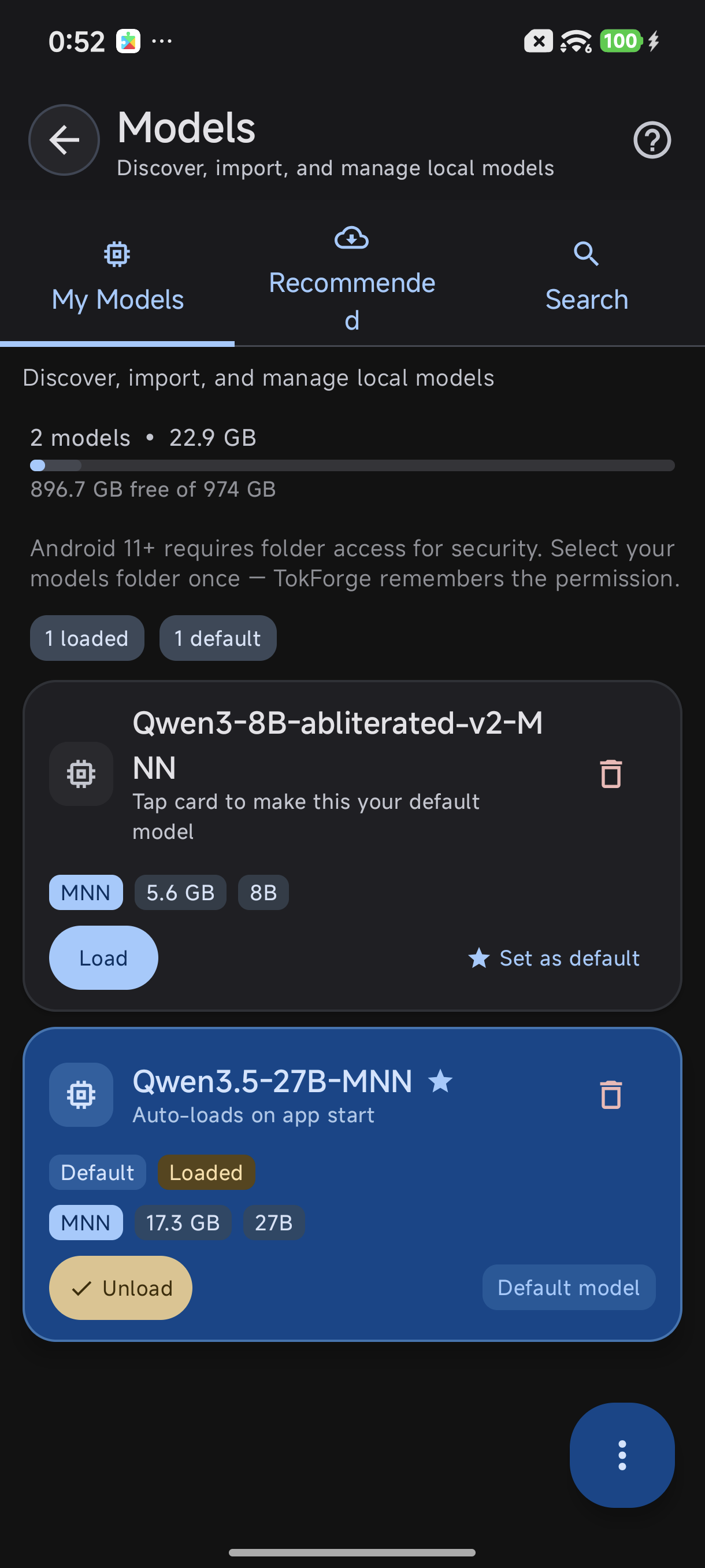
My Models tab: switch between downloaded models
Speed Boosters: Get More Out of Your Model
A few features can help without upgrading your phone:
TurboQuant (TQ4)
An optional memory-saving setting on Android (MNN models), off by default. It stores the attention cache (KV) in a compact quantized form, so long chats fit in less memory. The app still marks it as experimental.
Speculative Decoding
A small draft model proposes tokens and the main model verifies them, so quality stays intact. It is off by default and turns on automatically only where it measured faster.
GPU Acceleration
GPU acceleration is not automatically faster than CPU on a phone. On several device profiles in our own fleet the CPU path wins outright. AutoForge can test both on your phone so you can keep whichever is faster. Both MNN and GGUF models have GPU paths.
Storage Management: Keep Your Phone Organized
Models range from about 0.6GB to about 21GB. You can have multiple models downloaded at once, but only one loads into RAM and runs at a time.
- Keep multiple models for different tasks: a fast 4B for chat, an 8B for quality, a reasoning model for complex work
- Switch between them in TokForge's model browser; loading a model takes a moment
- Delete models you don't use from the Model Manager to free up storage
- Only the active model consumes RAM; downloaded models just take storage
Pro tip: Download a smaller model like Qwen3.5 2B as your everyday go-to, and a larger model for when you need deeper reasoning or creative writing.
Our Recommendations
Based on real-world testing across devices, here are the models we recommend for different use cases:
Best Starter Model
Qwen3.5 4B: Works on most 8GB+ phones (comfortable on flagship chipsets), and capable enough for everyday chat, writing, and research. This is the model we'd recommend if you're just getting started.
Best Quality Per GB
Qwen3.5 9B: The app's own first pick on 12GB and 16GB phones. Strong reasoning and creative writing.
Best for Roleplay
Qwen3 8B abliterated: Fewer refusals than the base model, and strong at character play, fiction and creative exploration. Available on 12GB+ devices.
Best for Reasoning
DeepSeek R1 Distill 7B: A chain-of-thought specialist that excels at math, logic, and deep analysis. Watch it think through your hardest questions.
Ready to Get Started?
Download TokForge on Google Play and explore the model browser to see which models are compatible with your device right now.
Also check out our Offline AI Guide and AutoForge Guide for more advanced topics.
Questions? Here's More
What if my phone has less than 4GB RAM?
If your device has 3GB or less, consider using a cloud-based AI service or upgrading your phone. TokForge is optimized for 4GB and above. Very small models (512MB to 800MB) exist but are too limited for practical use.
Can I run two models at once?
No. Only one model can be loaded in RAM at a time. To switch, select a new one in the model browser; it takes as long as loading that model.
Do larger models always give better answers?
Larger usually means smarter, but not always better for your use case. A 4B model with good training data often beats a poorly-trained 14B. Qwen and Llama are our favorite architectures for phones because of their quality-to-size ratio.
Can I use custom or fine-tuned models?
Yes, if they are in MNN or GGUF format. Use Import Model in the Model Manager for a file you already have, or search Hugging Face from the Browse tab.
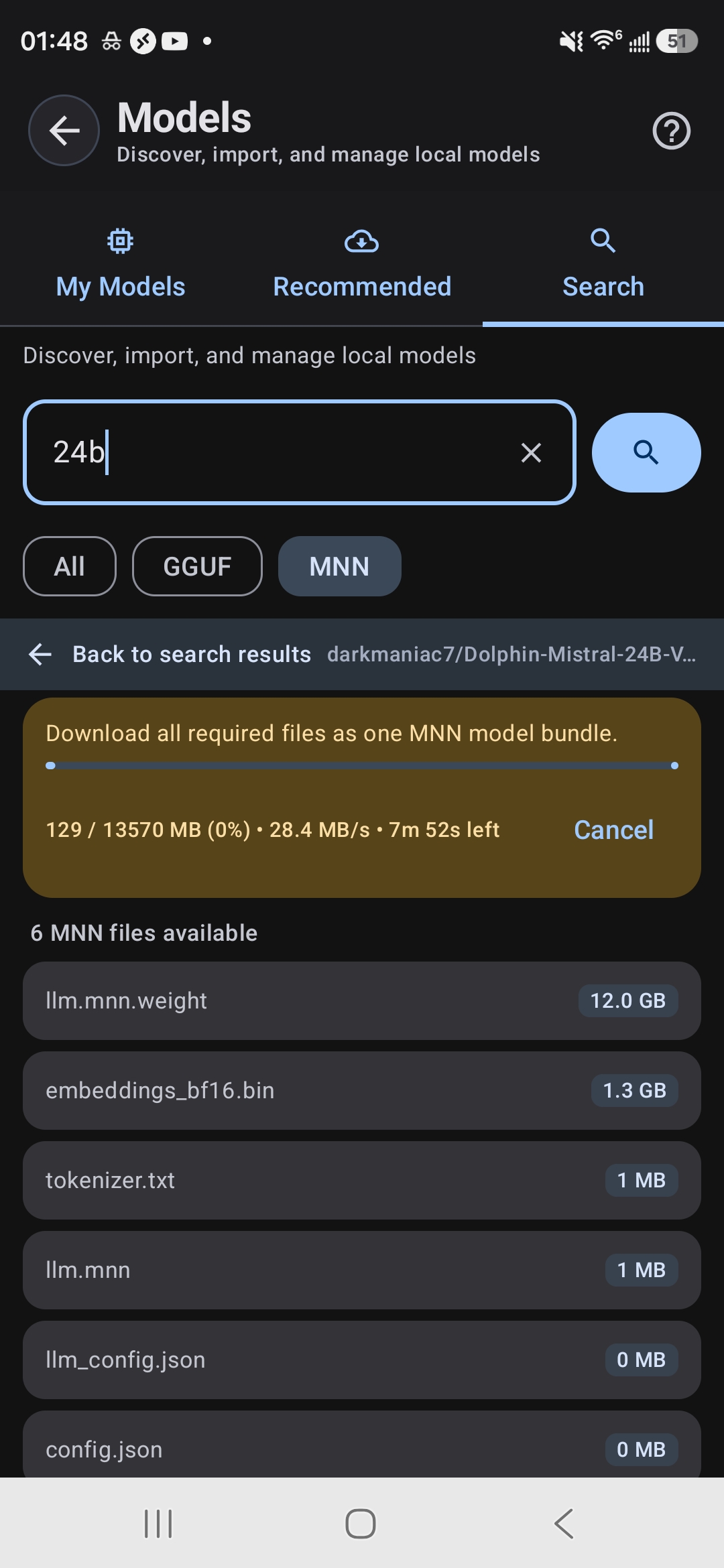
Search HuggingFace for any compatible model