Is Your Phone Fast Enough for Local AI?
The short answer: If your Android phone has 6GB or more of RAM, you can run AI models locally. 8GB is the sweet spot for good performance. Even budget phones from the last 2 to 3 years will work with smaller models. Keep reading to find out exactly what your device can run.
Minimum Requirements
Before you download TokForge, check that your phone meets these baseline specs:
- Android 8.0+ (API 26 or higher)
- 4GB RAM: Very basic models only (0.8B parameters)
- 6GB RAM: Recommended minimum; can comfortably run 2 to 3B models
- 2GB free storage per model: Model sizes vary; larger models need more space
If your phone has less than 4GB of RAM, local AI may not be practical. Consider using the Remote API backend to connect to a server instead.
RAM Tier Guide
The amount of RAM in your phone directly determines which AI models you can run and how fast they'll respond. Here's a quick reference:
| RAM | Experience | Models You Can Run | Example Devices |
|---|---|---|---|
| 4GB | Basic | 0.8B only | Budget phones 2022 to 2023 |
| 6GB | Good | Up to 3B | Pixel 7a, Samsung A54, most mid-range |
| 8GB | Great | Up to 4B | Pixel 8, Samsung S23, OnePlus 12R |
| 12GB | Excellent | Up to 8 to 9B | Pixel 9 Pro, Samsung S24, OnePlus 12 |
| 16GB | Premium | Up to 14B | Samsung S24 Ultra, OnePlus 13 |
| 24GB | Enthusiast | Up to 27B | Gaming phones, tablets |
Chipset Matters Too
RAM tells only part of the story. The processor and GPU in your phone affect how fast models run. Here's the hierarchy:
Snapdragon 8 Gen 3 / Elite
Fastest. Supports OpenCL GPU and experimental QNN acceleration. Get the best token-per-second rates on flagship phones.
Dimensity 9400 / 9300
Excellent. Supports Vulkan on Mali GPU. Measured ~8 tok/s on an 8B model with GGUF Vulkan CoopMat.
Snapdragon 8 Gen 2
Very good. Solid GPU performance. Suitable for models up to 8B with good thermal management.
Dimensity 8000 Series
Good. Supports OpenCL. Works well with 2 to 4B models.
Snapdragon 7 Series
Decent. CPU + OpenCL support. Better suited for small models (0.8B to 2B).
Older or Budget Chips
CPU-only execution. Still usable with tiny models (0.8B), but slower. GPU acceleration is not available.
How to Check Your Phone's Specs
Don't know your phone's RAM or chipset? It's easy to find:
RAM and Processor
- Open Settings
- Tap About Phone
- Look for RAM and Processor (or Chipset)
Detailed CPU/GPU Info
For more detail, download an app like CPU-Z from the Play Store. It shows your exact processor model, GPU, and thermal information.
In TokForge
Once you install TokForge, the Model Manager displays your available RAM, and ForgeLab automatically detects your device's capabilities and recommended model sizes.
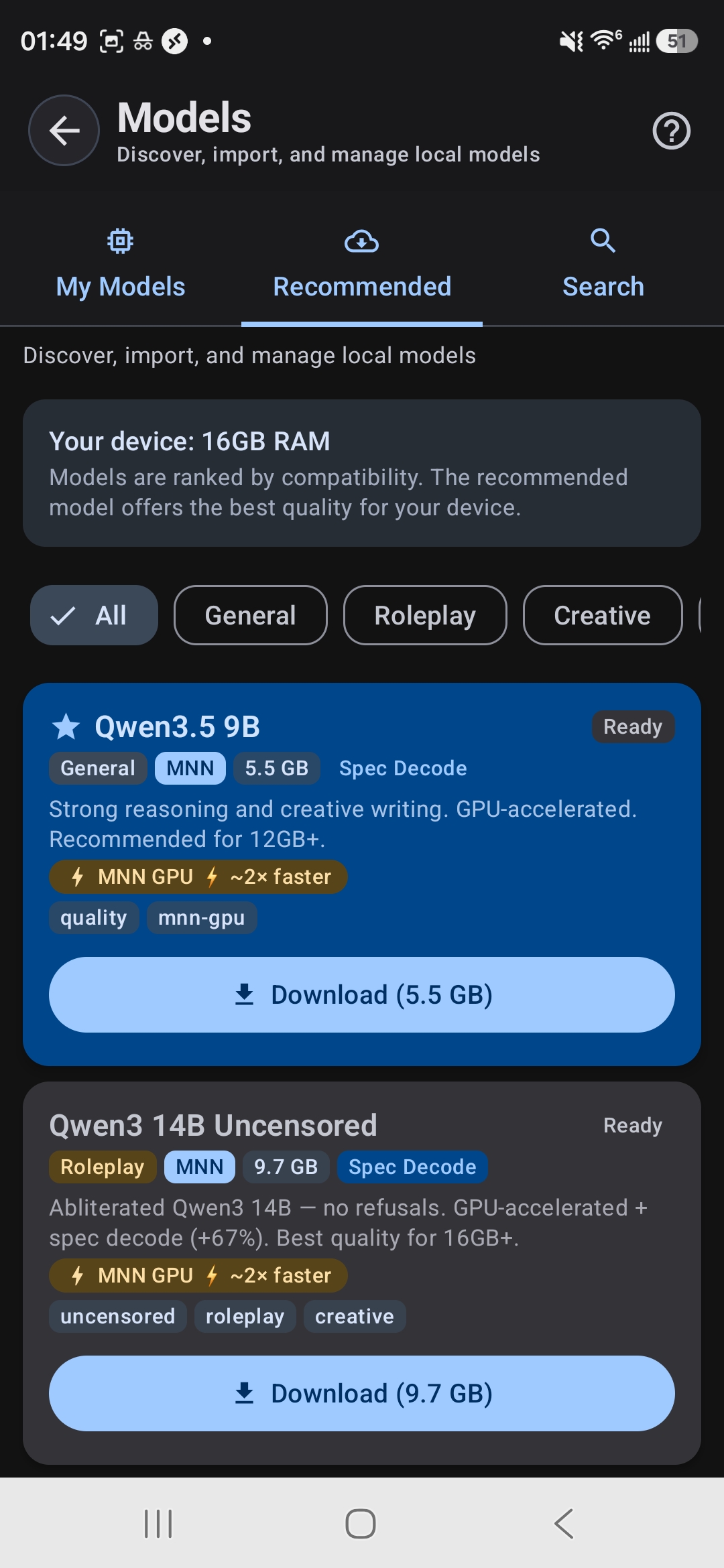
Model Browser shows your RAM and ranks models by compatibility
Tablets Work Great
Thinking about running AI on a tablet instead? Tablets often have larger RAM pools and superior thermal management, making them excellent for longer AI sessions and larger models. If you have a tablet with 8GB+ RAM, it's a fantastic choice for local AI work.
What If My Phone Is Too Weak?
Don't worry. If your phone can't run the models you want locally, you have another option: use the Remote API backend. Connect TokForge to a server running the AI model, and use TokForge as the chat interface. Your phone becomes the client, and the heavy lifting happens remotely. Zero changes to your workflow, just better performance.
Real Device Examples
Want to see what your device (or a device you're thinking of buying) can actually do? Here are real-world examples:
Samsung Galaxy S24 Ultra
Google Pixel 8
OnePlus Ace 5 Ultra
Samsung Galaxy A54
Budget Phone (Snapdragon 680 chipset)
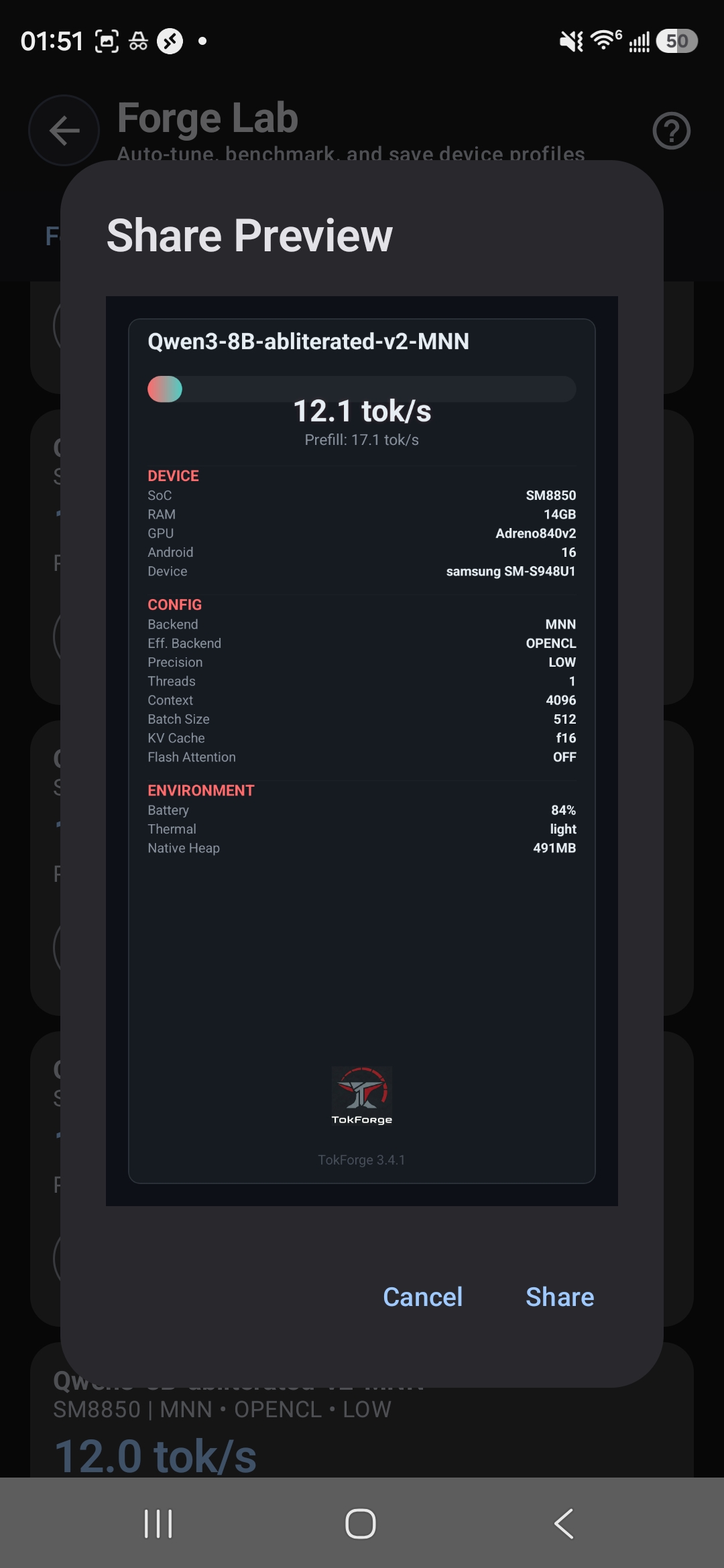
Benchmark card from Galaxy S24: 12.1 tok/s on Qwen3 8B with OpenCL
Ready to Run AI on Your Phone?
The best way to know if TokForge works for your device is to try it. It's free, and worst case you'll learn exactly what your phone can do.
Download TokForge Free on Google PlayQuick Answers
Can I run multiple models at once?
You can have multiple models installed on your phone, but only one can run at a time. Switch between them instantly in TokForge.
Does running AI drain my battery?
Running inference uses CPU/GPU, which does consume battery. On modern phones with good thermal management (like flagships), a typical 2 to 3 hour session will use 15 to 30% of your battery. Use battery saver mode to extend runtime.
Will my phone overheat?
Phones are designed to handle peak loads. TokForge includes thermal monitoring. If your device gets too hot, inference will automatically slow down to protect your hardware. Tablets handle heat better due to larger surface area.
What if I want to run really large models (27B+)?
That's what the Remote API is for. Connect to a server or PC running the model, and use your phone as the interface. TokForge handles both local and remote setups seamlessly.