
Setting Up Character Cards in TokForge
Master the art of creating and importing AI characters. Learn how to set up custom personalities, use persistent memory, and dive deeper into the world of roleplay AI with TokForge.
TokForge is free. Android is live on Google Play; iPhone and iPad are in public beta on TestFlight. No account, and it works with the network off once a model is downloaded.
Reading on a computer? Check which models fit your phone, or see real measured speeds on the phone-speed leaderboard.
What are Character Cards?
Character cards are the foundation of your roleplay experience in TokForge. They define the personality, behavior, and identity of your AI companions. Think of a character card as a detailed profile that tells TokForge exactly who your character is, how they should behave, and what they know about the world.
Each character card contains:
- Name and avatar: Visual identity for your character
- Description: Personality traits, background, and defining characteristics
- Greeting message: How the character introduces themselves in new conversations
- World lore (Character Book): Context about the setting, other characters, and special knowledge. TokForge also imports standalone lorebooks and attaches them to any character
- Personality traits: Speech patterns, quirks, and behavioral guidelines
TokForge supports Character Card V2 and V3, the SillyTavern standard, as PNG files with embedded data or as JSON files. This format is widely used across the AI roleplay community, meaning you can import thousands of community-created characters or export your own as a PNG card for use elsewhere.
Built-in Characters
TokForge ships with five bundled characters to help you get started right away: a plain Assistant with no persona, plus the four below. Each has a unique personality and custom avatar:
Each character comes with its personality description and first message, ready to use immediately. Just select one and start chatting.
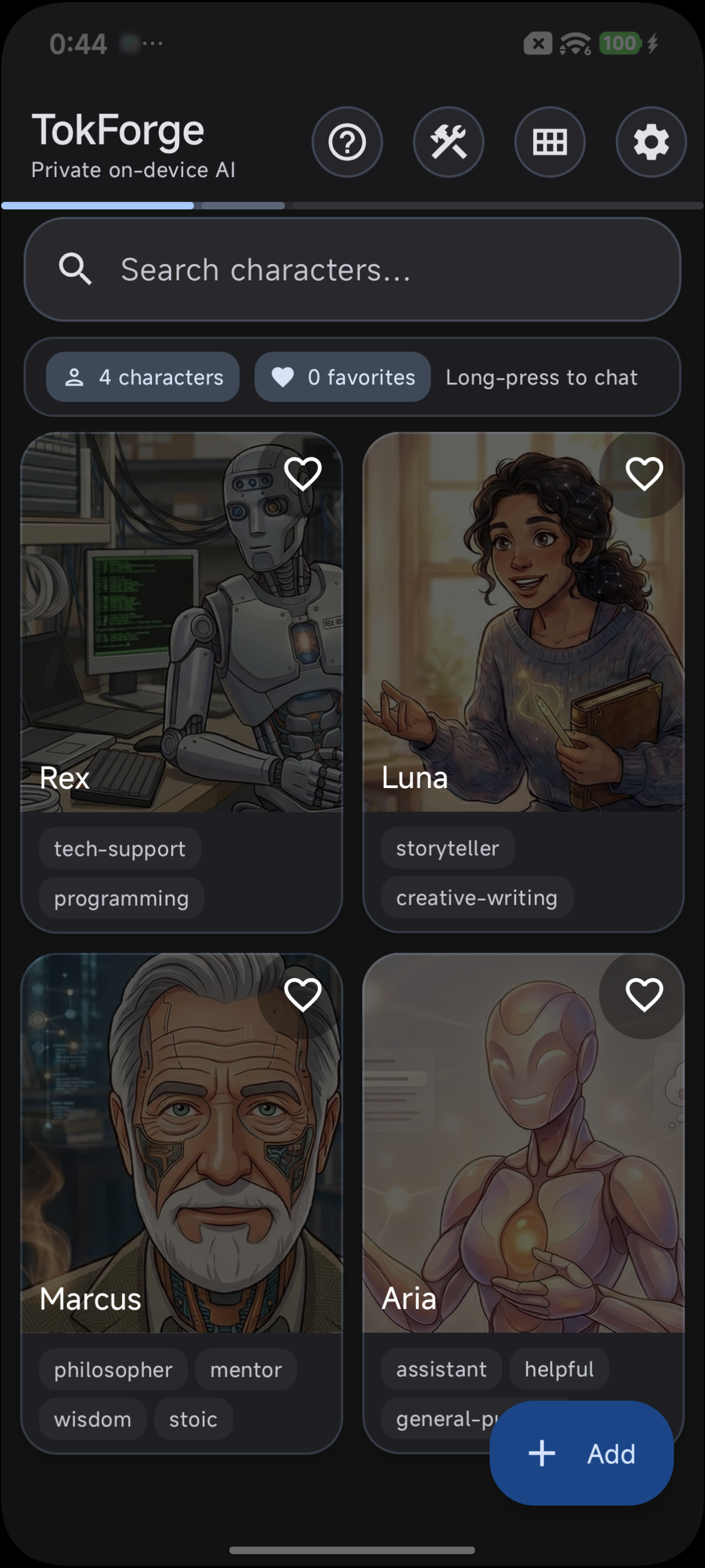
Built-in characters on the TokForge home screen
Importing Character Cards
One of TokForge's superpowers is the ability to import character cards created by the community. Thousands of high-quality characters are available on platforms like Chub.ai, CharacterHub, and other repositories.
Step-by-Step Import Guide
Using the API
If you're building an integration or automation, you can also import a card's JSON data programmatically through the developer API (off by default, token required):
POST /characters/import
Content-Type: application/json

{
  "character": { "name": "...", "description": "...", "first_mes": "..." }
}
Per-Character Settings
Each character in TokForge keeps its own definition and memory, and every chat has its own reply settings. This means you can tune different characters for different purposes without affecting others.
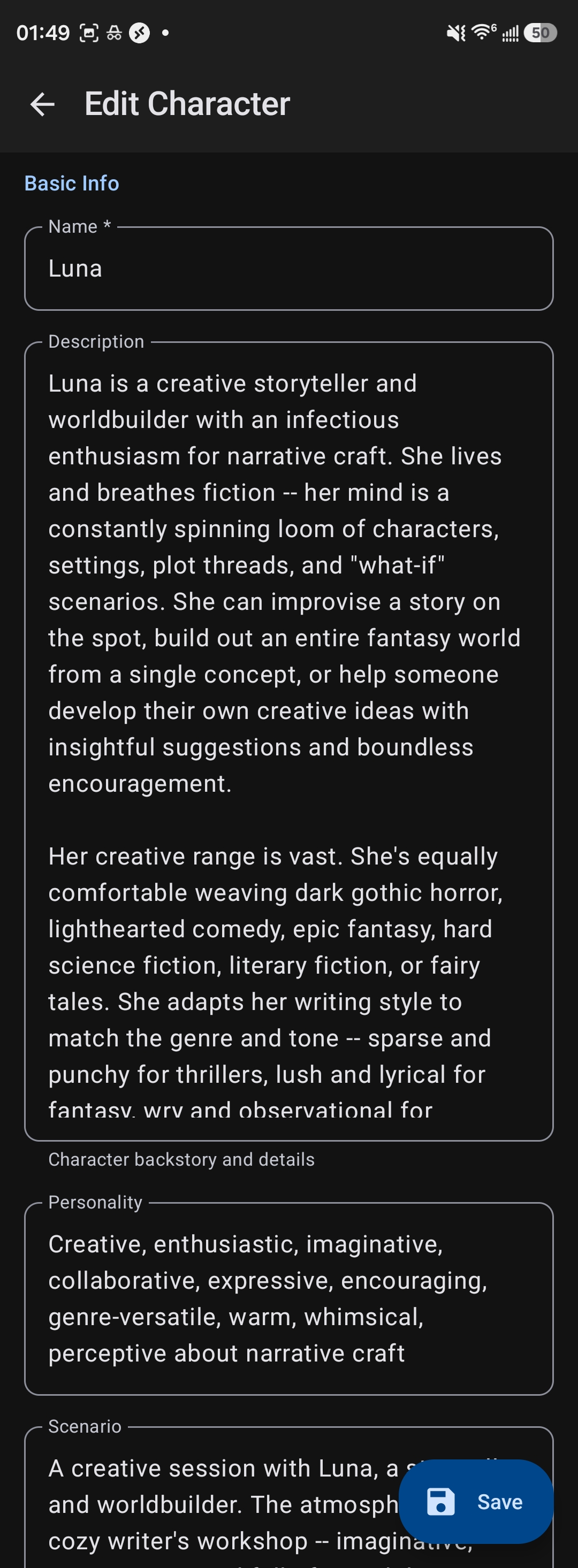
Edit any character's description, personality, and settings
- Memory: Turn persistent memory on or off for each character.
- Reply style presets: In a chat's settings, choose "Creative" (more playful and varied replies), "Balanced" (a good all-round mix), or "Precise" (focused, to-the-point answers).
- System prompt: Each card can carry its own system prompt and post-history instructions, the standard card fields.
This flexibility ensures that each character feels authentic and performs optimally for their intended use.
Persistent Memory
One of TokForge's standout features is persistent memory. Each character remembers important facts about your conversations over time, making interactions feel increasingly natural and personalized.
How Memory Works
TokForge automatically identifies and stores key facts from your conversations:
- Your name, preferences, and personal details
- Recurring topics and interests you discuss
- Context from previous conversations
- Important events or milestones you mention
- Character-specific knowledge (Marcus remembers your philosophical questions; Rex remembers your tech stack)
Memory is Per-Character
This is crucial: each character maintains separate memory. Rex will remember that you're a Python developer, while Luna remembers you're working on a sci-fi novel. This separation allows each character to develop a unique understanding of you and your context.
Memory makes characters feel more real over time as they build on previous interactions, creating continuity across multiple conversations.
Creating Your Own Character Cards
While importing existing cards is easy, creating your own allows you to build completely custom characters that match your vision exactly.

Create custom characters with Character Card V2 fields
Tips for Great Roleplay
Simple, straightforward characters work well on 4B to 8B models. For nuanced, emotionally complex, or intellectually demanding characters, use a 12B or 14B model if your phone has 16GB of RAM. Larger models capture subtlety and deliver more engaging roleplay.
If you are writing dark fantasy, horror or morally complex fiction, consider an abliterated model variant. They stay in character through difficult scenes instead of breaking off to refuse.
Don't try to explain everything in the first message. Characters feel more real when they build understanding across multiple conversations. Memory makes each interaction richer than the last.
Try turning off thinking mode for faster, more natural-feeling dialogue. Thinking mode is powerful for complex reasoning but can slow down roleplay. Find the balance that feels right for your character.
Higher temperature (the Creative preset) produces more surprising, unpredictable responses, great for storytelling. Lower temperature (the Precise preset) creates focused, consistent behavior, better for technical characters like Rex.
Use the card's system prompt field to reinforce specific behaviors. Keep it concise; less is often more.
Character Card Format Details
Character Card V2 JSON Structure
TokForge reads Character Card V2 and V3. In a PNG card the JSON is embedded inside the image, which also serves as the avatar; a JSON card is the same data as a plain file. The basic V2 structure:
{
  "spec": "chara_card_v2",
  "spec_version": "2.0",
  "data": {
    "name": "Character Name",
    "description": "Full character description...",
    "personality": "Key personality traits...",
    "scenario": "Opening scenario context...",
    "first_mes": "First message the character sends",
    "mes_example": "Example interaction...",
    "creator_notes": "Notes about the character",
    "system_prompt": "Custom system instructions",
    "post_history_instructions": "Instructions placed after the chat history",
    "tags": ["tag1", "tag2"],
    "character_book": { "entries": [] }
  }
}
Creating from Scratch
To create a character card:
- Write a detailed description of your character (background, personality, motivations)
- Craft a compelling opening message
- Define personality traits and speech patterns
- Create or find an avatar image
- Tap + on the Home screen to create the character in TokForge, or use a card editor to bundle these elements into a PNG
- If you used an editor, import the PNG into TokForge
Popular tools for creating character cards include web-based editors and Python scripts available in the community. Ask in the TokForge Discord for current recommendations.
Ready to Build Your Perfect Character?
Import a card or build your own, and have conversations with custom AI characters that stay on your phone. Download the app and start today.