Chat With Your Documents: TokForge RAG Guide
Learn how to use Document RAG (Retrieval-Augmented Generation) to have conversations with your PDFs, Word documents, and other files—all processed locally on your device.
What is Document RAG?
RAG stands for Retrieval-Augmented Generation. It's a technique that allows you to attach documents to your conversation and ask questions about them. The AI reads your document, understands its content, and provides answers grounded in what's actually written.
How RAG Works for You
Instead of relying on general knowledge, the AI retrieves relevant sections from your document and uses them to answer your questions. For example, you can ask "What does section 3 say about pricing?" and get an accurate answer based on your actual document content.
Key benefit: TokForge indexes your documents locally—nothing is uploaded to any server. Your documents stay private on your device.
Supported Document Formats
TokForge can handle a wide variety of document types, all processed directly on your device:
| Format | Extension | Notes |
|---|---|---|
| Portable Document Format | Text-based PDFs work best; scanned image PDFs not yet supported | |
| Microsoft Word | .docx | Modern Word format with full formatting support |
| EPUB | .epub | E-book format, great for novels and articles |
| Plain Text | .txt | Simple text files, perfect for notes and transcripts |
How It Works Under the Hood
Understanding the technology helps you get better results. Here's the simplified process:
Your document is split into semantic chunks—logical sections that make sense together, not arbitrary page breaks.
Each chunk is converted into a mathematical representation (an embedding) using BGE-small, a compact embedding model that runs entirely on your device. This allows TokForge to understand meaning without sending data to servers.
TokForge uses RAPTOR tree summarization to create hierarchical summaries of your document. This helps the system understand both fine details and the big picture, improving context retrieval.
When you ask a question, TokForge converts it to an embedding and finds the most relevant chunks using semantic search. It's not keyword matching—it understands meaning.
The relevant chunks are included as context in your conversation. The AI reads them and generates an answer grounded in your actual document.
Step-by-Step Walkthrough
Getting started with Document RAG is simple:
Create a new conversation or open an existing one. You can attach documents to any conversation at any time.
Look for the document or paperclip icon in the message input area. Tap it to open your device's file browser.
Browse your device and select a supported file (PDF, DOCX, EPUB, or TXT). You can attach multiple documents to the same conversation.
TokForge will index your document. Small documents typically complete in a few seconds; larger documents may take up to a minute. A progress indicator shows you what's happening.
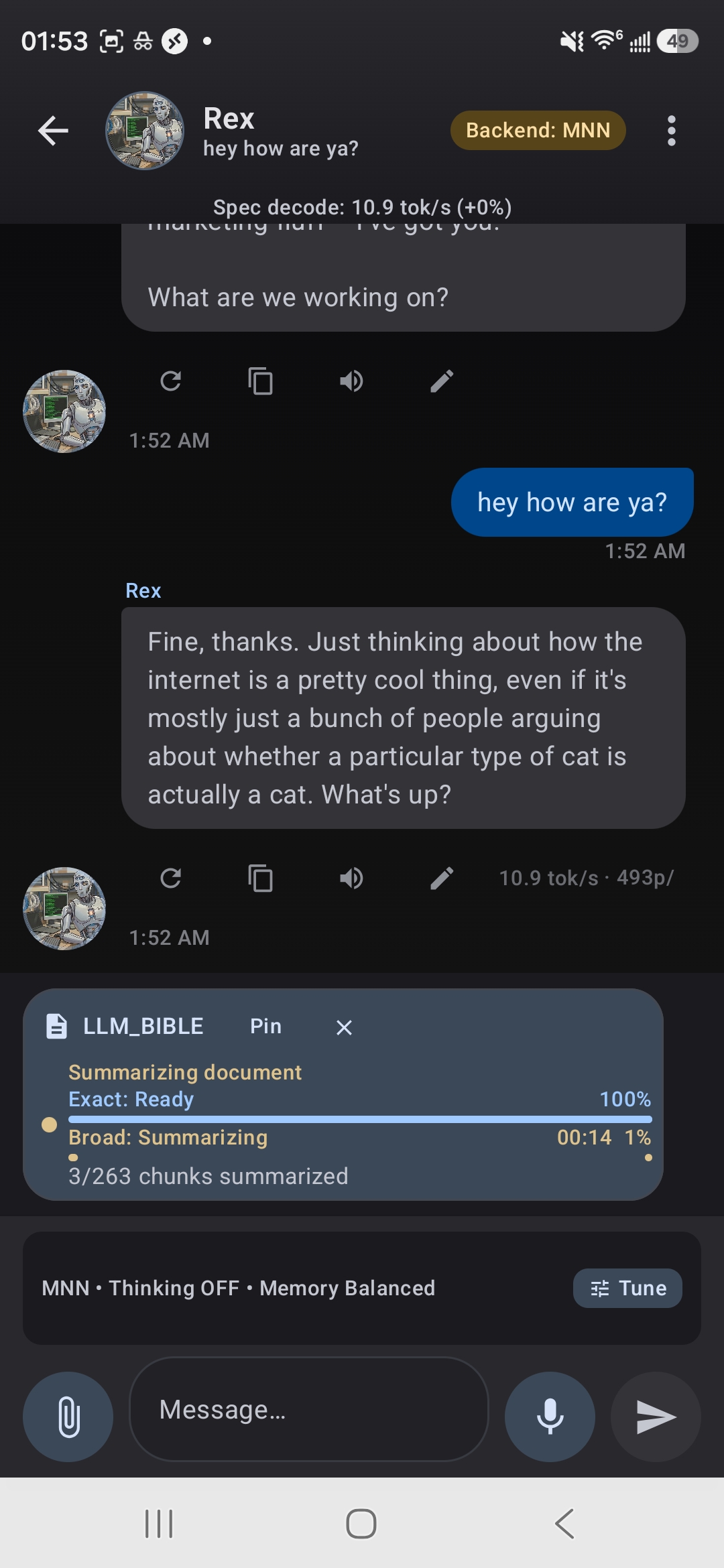
TokForge indexes your document locally — exact and broad search phases
Once indexing is complete, you can ask questions about your document. The AI will cite the relevant sections it used to answer you.
Best Practices
Follow these tips to get the most out of Document RAG:
- Use larger models when possible: 8B+ parameter models have better comprehension of complex documents and nuanced questions.
- Keep documents reasonably sized: Smaller documents index faster and produce more focused, accurate answers. Very long documents can be split if needed.
- Ask specific questions: "What's the policy on remote work?" yields better results than "summarize everything."
- Attach multiple documents: You can attach several documents to the same conversation to cross-reference or compare them.
- Review citations: The AI shows which parts of your document it's referencing. Use this to verify accuracy.
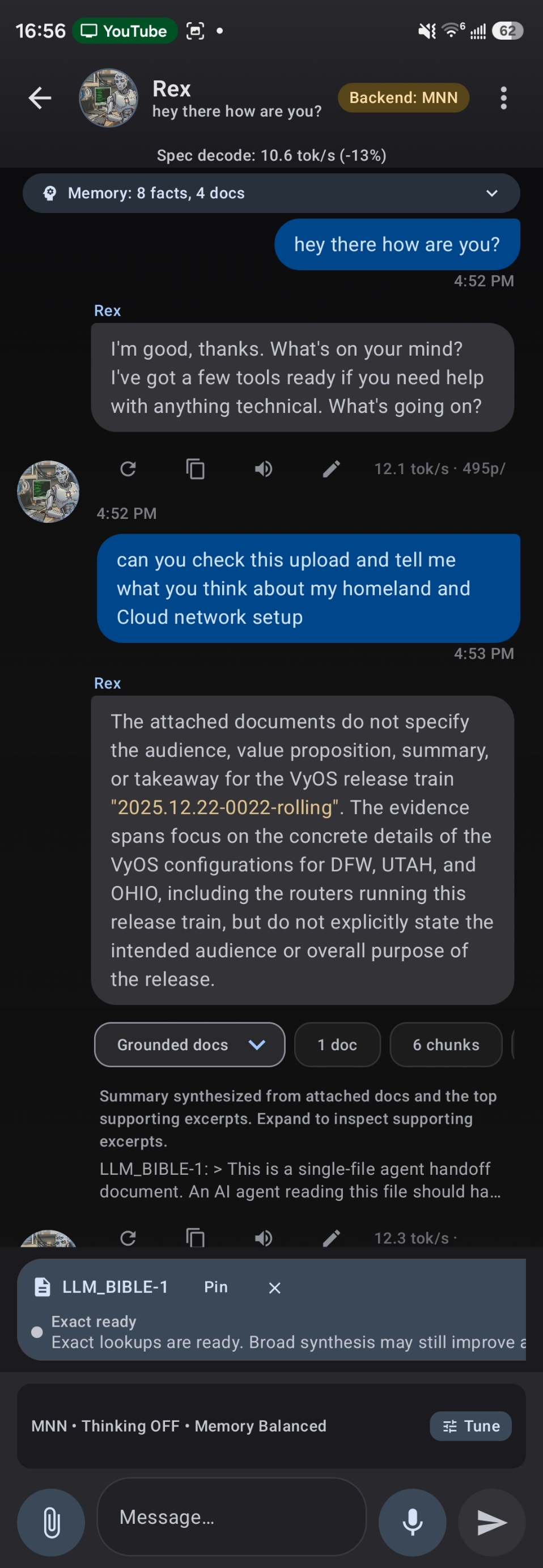
Grounded response citing 6 chunks from your document
Use Cases
Document RAG opens up many possibilities for productivity:
Limitations
While Document RAG is powerful, be aware of these current limitations:
- Scanned PDFs not supported yet: Documents that are images (scanned paper or photos) can't be indexed. They must be searchable text PDFs.
- Very long documents: Extremely long documents may need to be split into smaller files for optimal performance.
- Quality depends on model: Larger, more capable models provide better comprehension. Smaller models work but may miss nuance.
- Formatting limitations: Some complex formatting in DOCX files may not be perfectly preserved during processing.
Ready to Chat With Your Documents?
Download TokForge on Google Play and start using Document RAG today. All processing happens locally on your device—your documents stay private.