
AutoForge & Methodology
TokForge is free. Android is live on Google Play; iPhone and iPad are in public beta on TestFlight. No account, and it works with the network off once a model is downloaded.
Reading on a computer? Check which models fit your phone, or see real measured speeds on the phone-speed leaderboard.
Overview
AutoForge is TokForge's integrated benchmarking and optimization screen. It helps you systematically measure and optimize model performance on your device:
- Benchmark: Run standardized speed tests on any model configuration
- Optimize my phone: Automatically sweep configuration parameters across four optimization tiers (Instant, Quick, Thorough, Most thorough)
- Saved setups: Save best-performing configs and apply them
- Matrix: Compare results across devices, models, and backends
- Sharing: Export benchmark cards and JSON profiles for fleet analysis
Every benchmark result is stored with its complete configuration, making all performance measurements reproducible and comparable across devices.
AutoForge UI
The AutoForge screen is a three-tab interface for benchmarking and optimization:
Tab 1: Tune (Optimization Control)
Purpose: Configure and run AutoForge optimization sweeps.
What you can do:
- Pick the model to tune (Model to tune)
- Choose where it runs (Runs on: Automatic, CPU, or GPU)
- Pick how thorough the test should be (Instant, Quick, Thorough, or Most thorough)
- Tap Optimize my phone to start the sweep
- Watch real-time progress showing which parameters are being tested
- Compare Before and After (Optimized), then tap Apply Config, or Rollback to keep your previous setup
Typical workflow: Select your loaded model → Pick "Thorough" → Watch as TokForge tests different thread counts, KV cache settings, context lengths, and other speed settings, pausing to let the phone cool between tests → Review the result and tap Apply Config
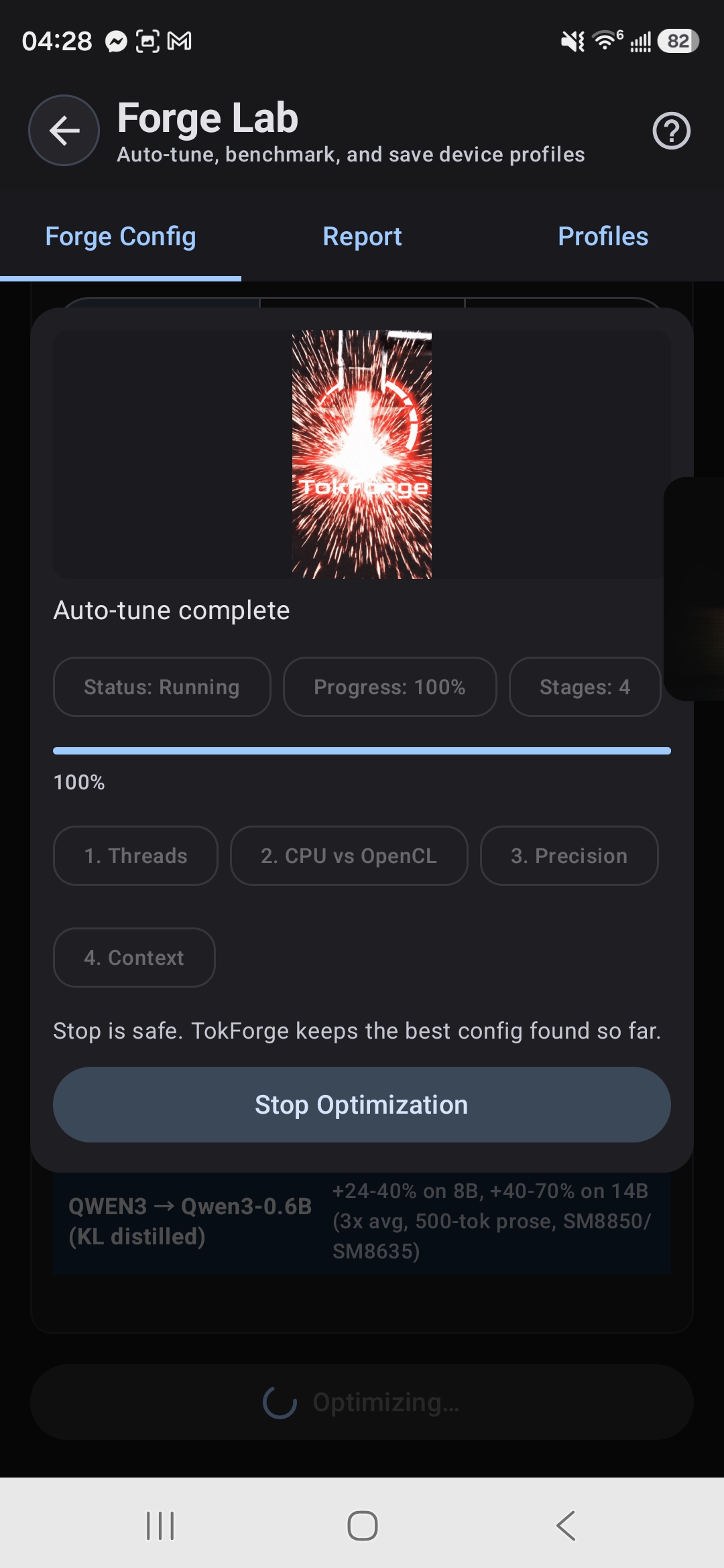
Tab 2: Results (Results & History)
Purpose: View benchmark results and historical performance data.
What you can see:
- Benchmark Card: Latest result with headline tok/s, prefill latency, model/device info, and spec decode uplift (if applicable)
- Benchmark History: Scrollable list of past runs with timestamps, backends, and performance metrics
- Run Benchmark: Run a single benchmark with custom prompt and token limits
- Export/Import: Share benchmarks as JSON or import results from other devices
The benchmark card shows your inference speed at a glance. Tap it to see full details like prefill time, delta prefill latency, total latency, spec decode results, and the exact configuration used. Share results as a compact card or a full report through your phone's share sheet.
Tab 3: Saved setups (Configuration Management)
Purpose: Manage saved configurations and apply them to inference.
What you can do:
- View all saved setups with their best tok/s scores
- See where each profile came from (manual benchmark, auto-tune, or imported)
- Apply a profile instantly to switch your inference config
- View the full parameter list of any profile
- Export a profile as JSON for sharing or backup
- Import profiles from files or paste JSON directly
Profiles are named by device SoC, model, and backend. When you apply a profile, TokForge loads those exact settings and returns you to chat with the new configuration active. No manual config editing needed.
Optimization Tiers
AutoForge offers four optimization tiers, from instant to most thorough. Each tier sweeps different parameter combinations to find the best configuration for your hardware and model. How long a tier takes depends on the phone and the model.
Instant
Use case: Get known-good settings right away.
- What it does: Stages known-good settings for your phone and model without running speed tests
- Parameters swept: None
- Output: A staged setup. Review it and tap Apply to save it
Quick
Use case: A short test of a few key settings.
- MNN: Tests thread counts and backend
- GGUF: Tests thread counts (plus the GPU backend if Vulkan is available)
- Output: A fast baseline configuration
Thorough
Use case: Tries more combinations of speed settings and pauses to let your phone cool between tests.
- MNN: Sweeps thread counts, backend, precision, KV cache, and context length, plus speculative decoding when an Acceleration Pack is installed for the model
- GGUF: Sweeps thread counts, batch_threads, KV cache types, flash attention, and context length (plus GPU backend if Vulkan is available)
- Output: A fuller optimal configuration across backends
Most thorough
Use case: The most complete test. Takes the longest and uses the most battery.
- MNN: All Thorough parameters, with a wider speculative decoding sweep
- GGUF: All Thorough parameters plus batch_size optimization
- Output: Complete performance landscape and detailed parameter sensitivity analysis
How Benchmarks Run
Warmup & Measured Runs
Every benchmark follows a standardized structure to ensure reproducible results:
- Warmup run (1 run): Primes CPU caches, GPU memory, and JIT compilation. Results are discarded.
- Measured runs (3 runs): Actual performance measurements. The median value is selected to reduce variance from outliers.
Metrics collected per run: Prefill latency (ms), decode latency (ms), tokens per second (tok/s), and token count.
Single Benchmark
A manual benchmark run sends a prompt to your loaded model and measures inference speed. You can customize:
- Prompt: Any text input (default: standardized benchmark prompt)
- Max tokens: Length of generated response (default: 128)
- Number of runs: Averaging (default: 3 measured runs)
Auto-Matrix
The auto-matrix feature benchmarks all combinations of installed models and available backends in one async operation. This produces a complete device performance matrix, useful for understanding which model/backend combination is fastest on your hardware.
TokForge Score & Metrics
TokForge Score: A composite metric computed as decode_tok/s × 0.7 + prefill_tok/s × 0.3. This weighted formula prioritizes decode speed (70%) while accounting for prefill latency (30%), reflecting real-world inference where generation throughput dominates user perception.
| Metric | Description | Unit |
|---|---|---|
| tok/s | End-to-end tokens per second (prompt + decode) | tokens/sec |
| Decode tok/s | Decode-only throughput (excludes prefill) | tokens/sec |
| Prefill tok/s | Prompt processing throughput | tokens/sec |
| Prefill latency | Time to process the input prompt before generating | milliseconds |
| Delta prefill | Latency for new messages only in multi-turn conversations (excludes cached context) | milliseconds |
| Decode latency | Total time spent generating output tokens | milliseconds |
| Token count | Number of tokens generated in the run | count |
Speculative Decoding Optimization
AutoForge can test speculative decoding (spec decode) for MNN models when an Acceleration Pack is installed for the model. It tries a few draft lengths and compares each against plain decoding on your phone.
Spec Decode Sweep Configuration:
- Thorough and Most thorough tiers: the draft model runs on the CPU; Most thorough tries more draft lengths and target backends
- Quick and Instant tiers: no spec decode testing
- Uplift measurement: Records the measured speedup percentage compared to target-only inference
Config profiles with spec decode: When an optimization tier tests spec decode, the resulting profile includes optimal draft backend, prediction length, draft thread count, and measured uplift percentage. Apply a profile to activate both the base inference configuration and its paired spec decode settings.
Typical workflow: Run a Thorough or Most thorough optimization, which automatically tests spec decode variants. Check results to see measured uplift percentages for each configuration. Apply a high-uplift profile to activate spec decode for your inference.
Hardware Profiling & Thermal Management
Before benchmarking, TokForge auto-detects your device's hardware profile:
- SoC model: Snapdragon 8 Elite, MediaTek Dimensity 9400+, etc.
- CPU topology: Performance cores vs efficiency cores, maximum frequency
- GPU architecture & Vulkan support: Adreno, Mali, or other GPU with Vulkan capability detection for MNN and GGUF
- RAM: Total available memory for model loading
- Android version & GPU renderer: Stored for reproducibility
This hardware profile informs recommended starting configurations and sets upper bounds for thread counts and context sizes. It also determines which paths (CPU, OpenCL, Vulkan) are available and which parameters are swept during optimization.
Thermal Management: AutoForge continuously monitors device temperature during optimization. When temperature thresholds are exceeded (moderate → severe → critical → emergency), the system automatically pauses benchmarking and waits for the device to cool before continuing. Thermal status and battery level are recorded with each benchmark result for context about measurement conditions.
Backend Comparison
TokForge runs text models on these paths, depending on the phone and the model:
- CPU: Multi-threaded CPU inference
- OpenCL: Adreno and Mali GPU acceleration via OpenCL
- Vulkan with MNN: offered as a choice in a model's hardware settings on tested GPU and model pairs; never switched on automatically
- Vulkan with llama.cpp (GGUF): llama.cpp's Vulkan GPU path on phones that support it
| Aspect | MNN | GGUF (llama.cpp) |
|---|---|---|
| Speed | Depends on the phone and model (see the leaderboard) | Depends on the phone and model |
| Format | .mnn directory | Single .gguf file |
| Quantization | Pre-converted MNN bundles, mostly 4-bit | Q4_K_M through Q8_0 |
| GPU acceleration | OpenCL and Vulkan, depending on the phone | OpenCL and Vulkan, depending on the phone |
| Vulkan support | Selectable per model on tested GPU and model pairs | GPU backend tested by AutoForge where Vulkan is available |
| Thinking models | Supported | Supported |
| Model coverage | Qwen3.5, Qwen3, Llama and Gemma builds in the catalogue | Broader ecosystem |
Configuration Profiles
A configuration profile is a complete set of inference settings saved per (SoC, model, backend, quantization) tuple. Profiles capture:
- Thread counts and batch parallelism settings
- Context length and batch_threads (GGUF)
- KV cache type (f16, q8_0, q4_0; memory vs. speed tradeoff)
- Precision mode / MNN backend selection (low = int8, normal = fp32)
- Flash attention (on/off for GGUF)
- GPU layer allocation (for MNN and GGUF Vulkan)
- Spec decode settings: optimal draft backend, prediction length, draft threads, and measured uplift percentage
Profile sources: Profiles are tagged by how they were created. Manual benchmarks create "benchmark" source profiles (highest priority). AutoForge creates "auto-tune" profiles. Device auto-detection creates "auto_profile" (lowest priority). Profiles from other devices are tagged "imported". This hierarchy ensures manually-tuned configs are never overwritten by automatic sweeps.
Applying a profile: When you tap Apply on a profile, TokForge loads those exact settings, switches backends if needed, unloads the current model, and reloads it with the new configuration. You return to chat automatically with the profile active.
Benchmark Matrix & Auto-Matrix
Benchmark Matrix: All results organize into a cross-model × cross-backend comparison grid by SoC × Model × Backend for easy comparison:
- See which device performs best with each model
- Compare MNN vs GGUF performance side-by-side
- Identify which models are well-optimized on your hardware
- View all saved configuration profiles linked to each result
Auto-Matrix: Run a comprehensive automated sweep across all loaded models and available backends in a single operation. Auto-Matrix benchmarks produce a complete device performance matrix useful for understanding which model/backend combination is fastest on your hardware.
Export/Import: Benchmark results and configuration profiles are exportable as JSON for cross-device sharing and fleet analysis. Deduplication ensures imported results don't create duplicates if the exact same configuration was already benchmarked locally.
Benchmark Cards & Sharing
Each benchmark result generates a card showing key metrics: headline tok/s, decode tok/s, prefill latency, total runtime, model name, device SoC, and thermal data. For speculative decoding configurations, cards display the measured uplift percentage.
Sharing options:
- Text share: Copy to clipboard or send via WhatsApp, Telegram, Signal, Email, Discord, Slack
- JSON export/import: Export benchmark results and configuration profiles as JSON for cross-device sharing and fleet analysis
- PNG export: Share benchmark cards with device info, thermal data, and TokForge branding
Imported benchmarks are merged into your local database and appear in your benchmark history. You can compare your device's results directly against results from colleagues running the same models.
Key Findings
- Which engine is faster depends on the phone and the model. Inference is typically memory-bandwidth bound on ARM, so measure on your own device, or compare real results on the leaderboard.
- Speculative decoding can be slower on mobile due to draft model overhead and bandwidth contention between main and draft models. That is why TokForge keeps it off by default and turns it on automatically only where it measured faster.
- Thread count matters: Performance cores only (not efficiency cores) should be used for inference threads. AutoForge detects the optimal split.
- Flash attention is off by default and is not used on CPU-only configurations. AutoForge tests whether it helps on your device rather than assuming it does.
- Quick and Thorough tiers capture most optimization gains for typical use cases. Most thorough is valuable when you want repeated, reliable measurements.
Reproducibility & Benchmark Entity
Every benchmark result is stored with its complete configuration profile and runtime fingerprint. This means any result can be reproduced on identical hardware by loading the same profile. Each benchmark entity records:
- Device fingerprint: SoC, CPU cores, GPU, RAM, Android version, and GPU renderer
- Model info: Model name, quantization, parameter count
- Full configuration used: Backend type (MNN / GGUF / Remote), thread counts, batch size, context length, KV cache type, precision mode, flash attention, spec decode settings
- Results: tok/s, decode tok/s, prefill tok/s, prefill latency, decode latency, total timing
- Environment: Battery percent, thermal status, available heap memory at test time
- Metadata: Timestamp, benchmark tier used, spec decode uplift if applicable
Results that show unusual performance (e.g., heavy throttling) are tagged with thermal and battery data so you can identify when a device was under stress. Cross-device comparisons use exact runtime fingerprint matching to ensure accurate performance attribution.
API Access
All AutoForge functionality is available programmatically via the on-device control API. See the API documentation for complete details. Sample endpoints include:
POST /control/auto-tune: Start an AutoForge sweep with a specified tierGET /control/auto-tune/status: Check progress of running optimizationPOST /benchmark/run: Run a single benchmark with custom prompt and token limitsGET /benchmark/results: Query stored benchmark results with filteringGET /benchmark/matrix: Get SoC × Model × Backend comparison matrixPOST /benchmark/auto-matrix: Run comprehensive cross-model benchmarkGET /benchmark/optimal-config: Get the best profile for a device/model/backend comboGET /benchmark/export: Export all results and profiles as JSONPOST /benchmark/import: Import results and profiles from another deviceGET /forge/profiles: List all saved setupsPOST /forge/profiles/import: Import saved setups from another device
Benchmark tips: Rotating tips are displayed during optimization waits to help guide users through longer sweeps.