Controlling TokForge From Your Computer: API Walkthrough
A complete guide to the TokForge MetricsService API. Control inference, manage models, read conversations, and monitor performance, all from your computer or another application.
What is the TokForge API?
TokForge includes a built-in HTTP API server called MetricsService that exposes over 120 endpoints for remote control and monitoring. Whether you want to programmatically start conversations, load models, read inference metrics, or automate tasks on your phone from a desktop script, the TokForge API makes it possible.
The API is:
- NanoHTTPD-based: A lightweight embedded HTTP server running on your phone
- Bearer token authenticated: All requests require an authorization header
- Local network friendly: Designed for LAN access or ADB forwarding
- RESTful: Standard HTTP methods (GET, POST, PUT, DELETE)
- JSON-based: Request/response bodies in JSON format
The MetricsService API runs on port 8088 by default and requires explicit enabling in the app settings.
Enabling the API on Your Phone
Before you can connect from your computer, you'll need to enable the API server in TokForge settings.
Step-by-Step Setup
- Open TokForge on your Android device
- Navigate to Settings (gear icon), then switch to Advanced mode (toggle at the top of Settings)
- Open the Developer section: "Developer / Server" (v3.5) or "Developer tools (Advanced)" (v3.6). It is not a top-level "Settings → Advanced → Metrics Server" item. You must enable Advanced mode first, then go into the Developer section.
- Find the "Metrics Server" section
- Toggle "Enable Metrics Server" ON
- Set a Bearer Token: Choose a secure token string (e.g.,
mytoken123for testing). This is required for all API requests - Choose Bind Host:
- 127.0.0.1 (localhost only): Accessible only from the device itself or via ADB port forwarding (
adb forward tcp:8088 tcp:8088). Use this for development and testing, or when your Wi-Fi blocks device-to-device traffic. - 0.0.0.0 (all interfaces): Accessible from any device on your LAN (e.g.
http://192.168.1.100:8088/health). Use this for remote control from another computer, AI agents, or Home Assistant. Use only on trusted networks.
- 127.0.0.1 (localhost only): Accessible only from the device itself or via ADB port forwarding (
- Note your phone's IP address (if using all interfaces). Find it in Settings > About Phone > IP Address, or use
ifconfigon the device
Release builds honor your Bind Host choice. If you select All interfaces (0.0.0.0), the server binds to0.0.0.0and is reachable over your LAN on a normal Play Store / release build. You do not need a debug build or ADB to connect from another device. The only difference between build types is the first-run default: release builds default to localhost (127.0.0.1) for safety, debug builds default to0.0.0.0. Either way you can switch the Bind Host in Settings, and auth (a Bearer token) is always required when bound to0.0.0.0.
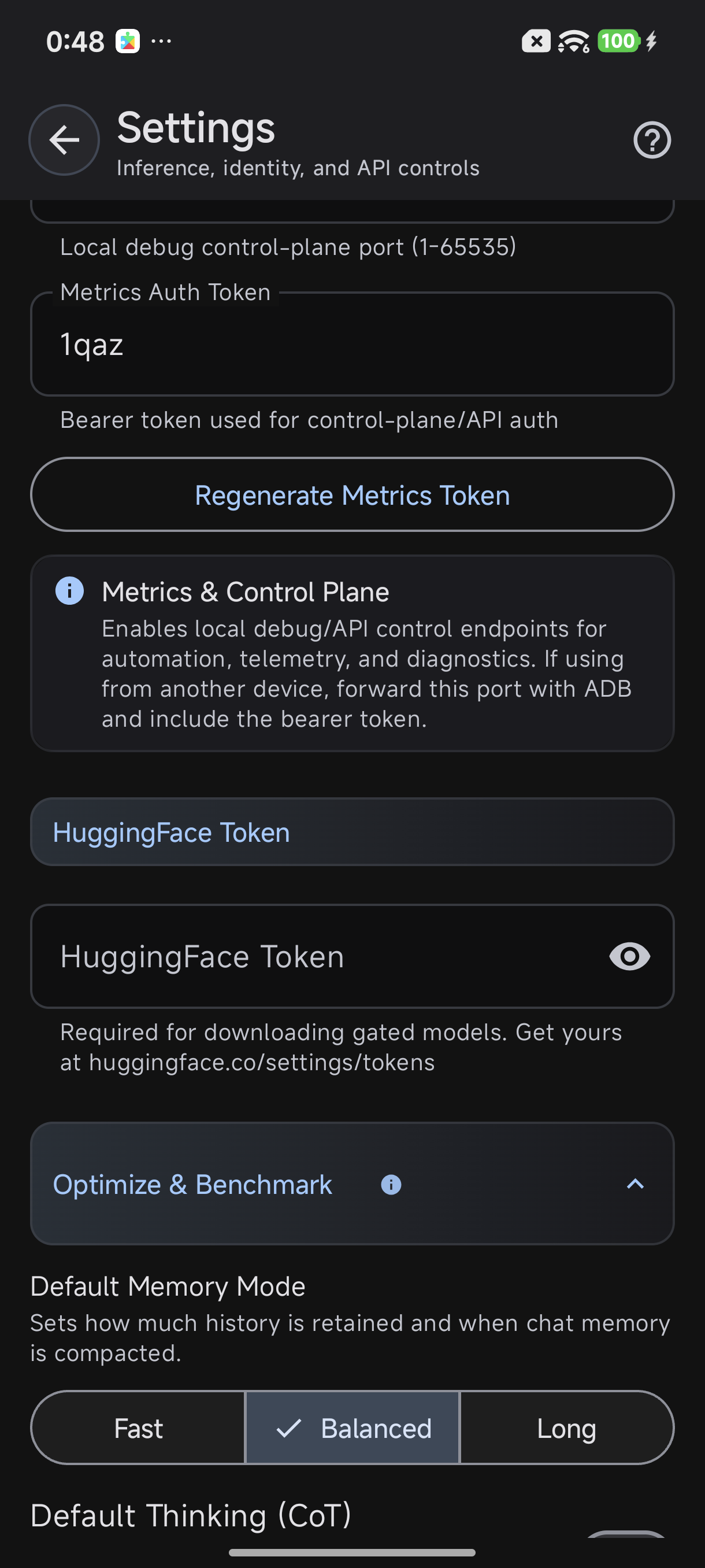
Enable Metrics Server in Settings → Advanced mode → Developer / Server (v3.5) / Developer tools (Advanced) (v3.6) → Metrics Server
Default port is 8088. You can customize this in settings if needed.
Connecting From Your Computer
Once the API is enabled, you have two options to connect: direct LAN access or ADB tunneling.
Option A: Direct LAN Access
If you bound the API to "All Interfaces" and your phone and computer are on the same network:
curl -H "Authorization: Bearer mytoken123" http://192.168.1.100:8088/healthReplace 192.168.1.100 with your phone's actual IP address. A quick browser test works too: open http://192.168.1.100:8088/health in any browser on the same network. If you see a small block of JSON starting with {, the connection works (/health needs no token). For protected endpoints, send your token as an Authorization: Bearer <token> header.
If /health times out even though both devices are on the same Wi-Fi: some home/guest networks (and "AP isolation" / "client isolation" settings on the router) block devices from talking to each other. That's almost always the router, not TokForge. In that case, fall back to ADB Port Forwarding (Option B below), which connects over a USB/ADB cable instead of the network.
Option B: ADB Forwarding
If you bound the API to localhost only, use ADB to forward the port:
adb forward tcp:8088 tcp:8088Then connect via localhost:
curl -H "Authorization: Bearer mytoken123" http://localhost:8088/healthTest Your Connection
Hit the health endpoint to verify your connection is working:
curl -H "Authorization: Bearer mytoken123" http://192.168.1.100:8088/healthExpected response:
{
  "status": "ok",
  "mnn_loaded": true,
  "any_model_loaded": true,
  "runtime_mb": 35,
  "free_mb": 12,
  "uptime_seconds": 3847,
  "api_version": "1.0.0"
}
Essential Endpoints Walkthrough
Here's a detailed tour of the most commonly used endpoints. All examples assume your token is mytoken123 and your phone is at 192.168.1.100:8088.
GET /health
Request:
curl -H "Authorization: Bearer mytoken123" http://192.168.1.100:8088/healthResponse:
{
  "status": "ok",
  "mnn_loaded": true,
  "any_model_loaded": true,
  "runtime_mb": 35,
  "free_mb": 12,
  "uptime_seconds": 3847,
  "api_version": "1.0.0",
  "device_model": "Pixel 7 Pro",
  "android_version": "13"
}
GET /models/downloaded
Request:
curl -H "Authorization: Bearer mytoken123" http://192.168.1.100:8088/models/downloadedResponse:
{
  "models": [
    {
      "id": "mistral-7b",
      "name": "Mistral 7B",
      "size_mb": 4096,
      "parameter_count": 7000000000,
      "type": "llm",
      "quantization": "Q4_K_M",
      "loaded": true
    },
    {
      "id": "phi-2",
      "name": "Phi-2",
      "size_mb": 2700,
      "parameter_count": 2700000000,
      "type": "llm",
      "quantization": "Q4_K_M",
      "loaded": false
    }
  ]
}
POST /models/{id}/load
Request:
curl -X POST -H "Authorization: Bearer mytoken123" \
  http://192.168.1.100:8088/models/mistral-7b/load
Response:
{
  "status": "loading",
  "model_id": "mistral-7b",
  "model_name": "Mistral 7B",
  "estimated_load_time_seconds": 5
}
GET /models/recommended
Request:
curl -H "Authorization: Bearer mytoken123" http://192.168.1.100:8088/models/recommendedResponse (truncated):
{
  "models": [
    {
      "id": "mistral-7b",
      "name": "Mistral 7B",
      "description": "Fast, capable 7B model. Great for chat.",
      "category": "chat",
      "size_mb": 4096,
      "required_ram_mb": 6000,
      "quantization": "Q4_K_M",
      "downloads": 15042
    },
    {
      "id": "phi-2",
      "name": "Phi-2",
      "description": "Microsoft's 2.7B powerhouse. Fast inference.",
      "category": "chat",
      "size_mb": 2700,
      "required_ram_mb": 4500,
      "quantization": "Q4_K_M",
      "downloads": 8231
    }
  ]
}
POST /conversations/new
Request:
curl -X POST -H "Authorization: Bearer mytoken123" \
  -H "Content-Type: application/json" \
  -d '{"character_id": 4}' \
  http://192.168.1.100:8088/conversations/new
Response:
{
  "conversation_id": "conv_78f3a2d9",
  "character_id": 4,
  "character_name": "Claude",
  "created_at": "2026-04-07T14:23:45Z",
  "status": "active"
}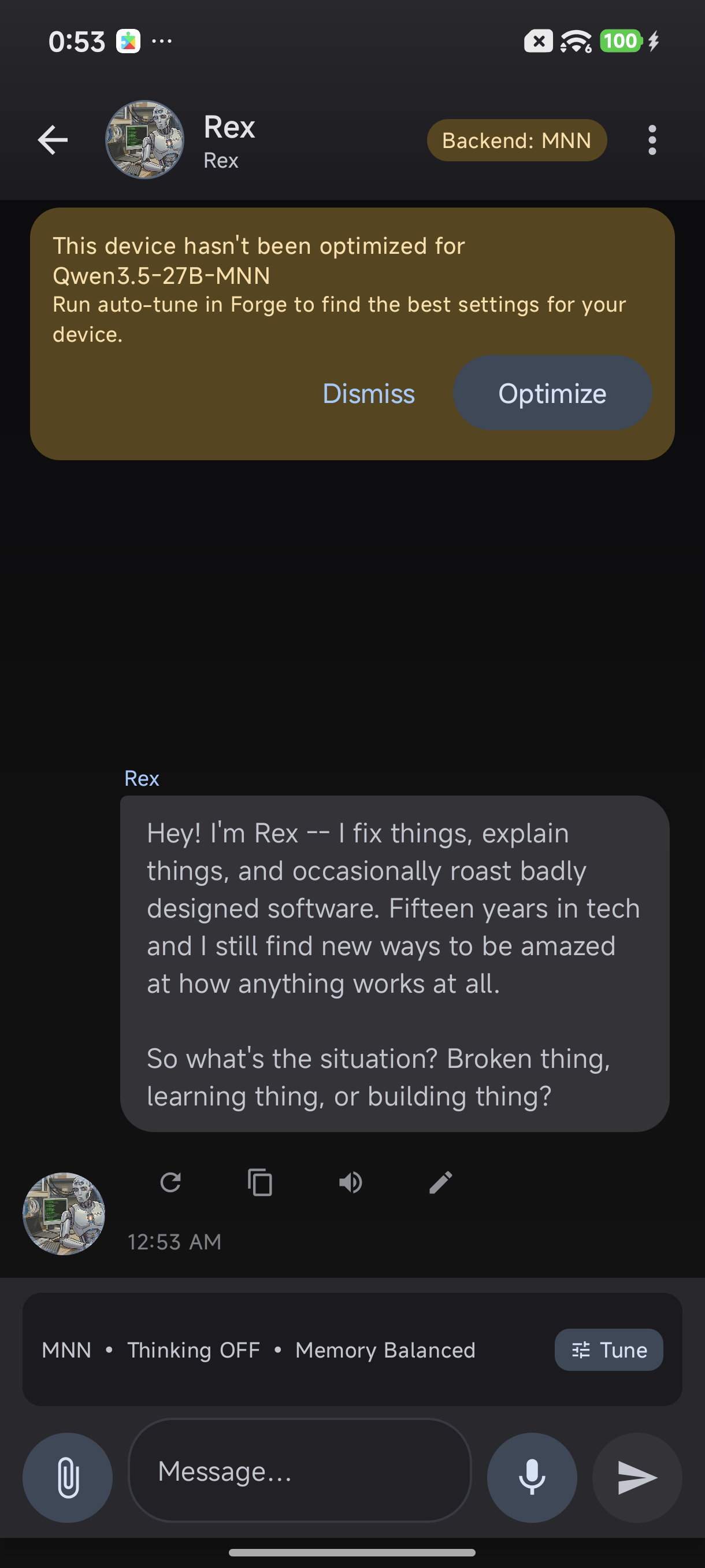
The app navigates to chat when you create a conversation via API
POST /conversations/{id}/send
Request:
curl -X POST -H "Authorization: Bearer mytoken123" \
  -H "Content-Type: application/json" \
  -d '{"message": "What is machine learning?"}' \
  http://192.168.1.100:8088/conversations/conv_78f3a2d9/send
Response:
{
  "message_id": "msg_5f8c9a21",
  "conversation_id": "conv_78f3a2d9",
  "user_message": "What is machine learning?",
  "ai_response": "Machine learning is a subset of artificial intelligence where systems learn and improve from experience without being explicitly programmed...",
  "telemetry": {
    "total_tokens": 187,
    "prompt_tokens": 34,
    "completion_tokens": 153,
    "tokens_per_second": 18.5,
    "time_to_first_token_ms": 142,
    "prefill_time_ms": 156,
    "decode_time_ms": 8243,
    "backend": "MNN",
    "backend_version": "0.4.1"
  },
  "memory": {
    "used_mb": 4200,
    "free_mb": 8,
    "runtime_mb": 42
  },
  "timestamp": "2026-04-07T14:24:12Z"
}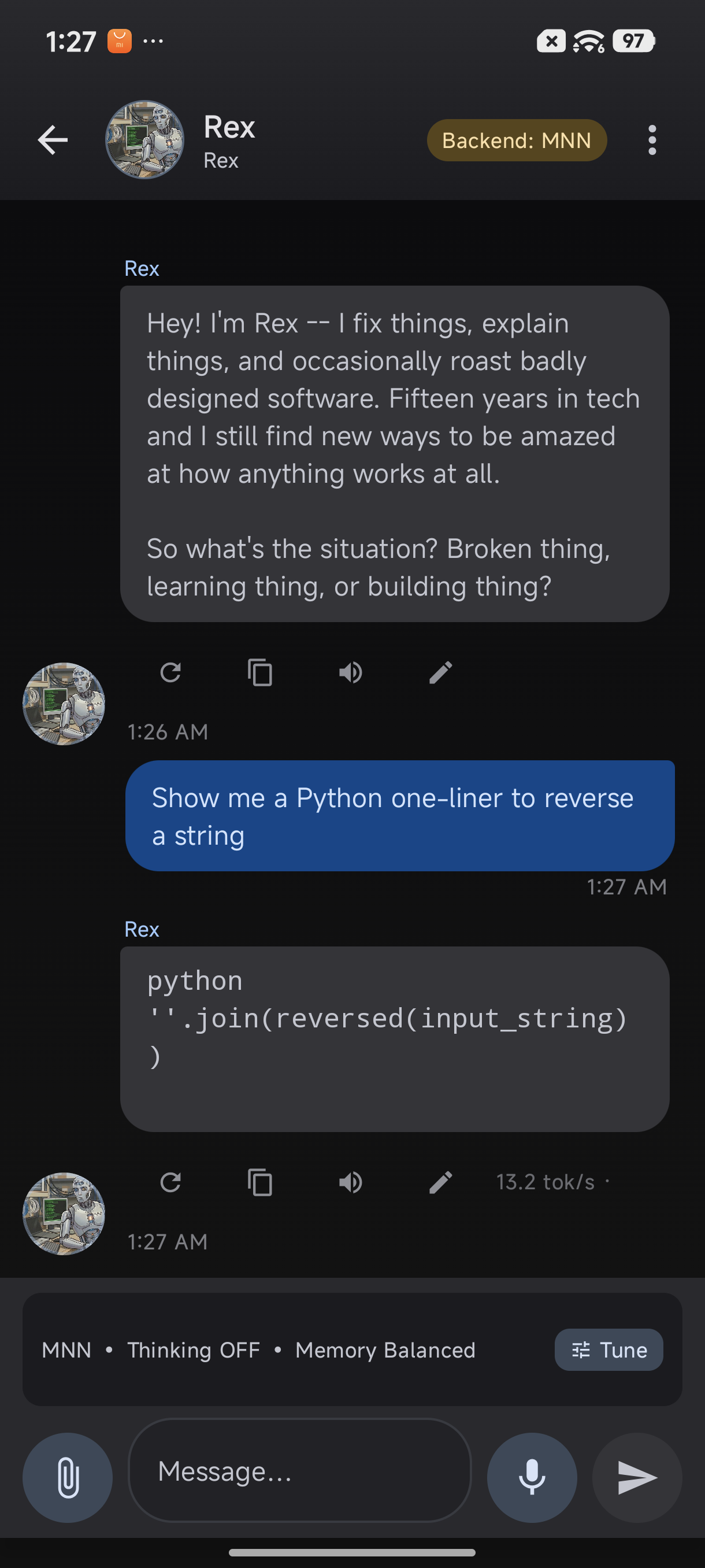
Response with code rendering and 13.2 tok/s telemetry badge
GET /characters
Request:
curl -H "Authorization: Bearer mytoken123" http://192.168.1.100:8088/charactersResponse (truncated):
{
  "characters": [
    {
      "id": 1,
      "name": "Assistant",
      "personality": "Helpful, harmless, and honest AI assistant.",
      "tags": ["helpful", "neutral", "general"],
      "description": "A general-purpose AI assistant.",
      "avatar_url": "https://..."
    },
    {
      "id": 4,
      "name": "Claude",
      "personality": "Thoughtful, analytical, and creative.",
      "tags": ["analytical", "thoughtful", "creative"],
      "description": "An AI assistant focused on reasoning and clarity.",
      "avatar_url": "https://..."
    }
  ]
}
GET /memory/facts
Request:
curl -H "Authorization: Bearer mytoken123" \
  "http://192.168.1.100:8088/memory/facts?character_id=4"
Response:
{
  "character_id": 4,
  "facts": [
    {"fact": "User's name is Alex", "confidence": 0.95},
    {"fact": "User prefers dark mode", "confidence": 0.88}
  ]
}
GET /memory/stats
Request:
curl -H "Authorization: Bearer mytoken123" \
  "http://192.168.1.100:8088/memory/stats?character_id=4"
Response:
{
  "character_id": 4,
  "total_conversations": 47,
  "total_messages": 1203,
  "memory_facts": 12,
  "last_interaction": "2026-04-07T13:45:22Z"
}
POST /control/open-model-browser
Request:
curl -X POST -H "Authorization: Bearer mytoken123" \
  http://192.168.1.100:8088/control/open-model-browser
Response:
{"status": "success", "screen": "model_browser"}POST /control/open-forge-lab
Request:
curl -X POST -H "Authorization: Bearer mytoken123" \
  http://192.168.1.100:8088/control/open-forge-lab
Response:
{"status": "success", "screen": "forge_lab"}GET /control/generation-status
Request:
curl -H "Authorization: Bearer mytoken123" \
  http://192.168.1.100:8088/control/generation-status
Response:
{
  "is_generating": true,
  "conversation_id": "conv_78f3a2d9",
  "tokens_generated": 42,
  "elapsed_seconds": 2.3,
  "tokens_per_second": 18.26,
  "model_id": "mistral-7b"
}
GET /settings
Request:
curl -H "Authorization: Bearer mytoken123" \
  http://192.168.1.100:8088/settings
Response (truncated):
{
  "theme": "dark",
  "notification_enabled": true,
  "auto_backup": true,
  "inference_timeout_seconds": 300,
  "max_context_length": 4096
}
POST /settings/{key}
Request:
curl -X POST -H "Authorization: Bearer mytoken123" \
  -H "Content-Type: application/json" \
  -d '{"value": "light"}' \
  http://192.168.1.100:8088/settings/theme
Response:
{"key": "theme", "value": "light", "status": "updated"}GET /debug/logcat
Request:
curl -H "Authorization: Bearer mytoken123" \
  http://192.168.1.100:8088/debug/logcat
Response (truncated):
{
  "logs": [
    "[14:23:45] Model loaded successfully: mistral-7b",
    "[14:24:12] Inference started for conversation conv_78f3a2d9",
    "[14:24:14] Generated 153 tokens at 18.5 tok/s"
  ],
  "timestamp": "2026-04-07T14:25:00Z"
}
Build a Simple Python Script
Let's create a practical Python script that connects to TokForge, lists models, starts a conversation, and sends messages.
Requirements:
- Python 3.7+
requestslibrary:pip install requests
Complete working example:
import requests
import json
import time

# Configuration
API_BASE = "http://192.168.1.100:8088"
TOKEN = "mytoken123"

def get_headers():
    """Return headers with bearer token"""
    return {
        "Authorization": f"Bearer {TOKEN}",
        "Content-Type": "application/json"
    }

def check_health():
    """Check API health"""
    response = requests.get(f"{API_BASE}/health", headers=get_headers())
    return response.json()

def list_models():
    """List downloaded models"""
    response = requests.get(f"{API_BASE}/models/downloaded", headers=get_headers())
    return response.json()["models"]

def start_conversation(character_id=4):
    """Start a new conversation"""
    data = {"character_id": character_id}
    response = requests.post(
        f"{API_BASE}/conversations/new",
        headers=get_headers(),
        json=data
    )
    return response.json()

def send_message(conversation_id, message):
    """Send a message in a conversation"""
    data = {"message": message}
    response = requests.post(
        f"{API_BASE}/conversations/{conversation_id}/send",
        headers=get_headers(),
        json=data
    )
    return response.json()

# Main execution
if __name__ == "__main__":
    print("Checking API health...")
    health = check_health()
    print(f"Status: {health.get('status')}")
    print(f"Model loaded: {health.get('any_model_loaded')}")
    print()

    print("Listing downloaded models...")
    models = list_models()
    for model in models:
        print(f"  - {model['name']} ({model['size_mb']}MB)")
    print()

    print("Starting conversation with Claude...")
    conv = start_conversation(character_id=4)
    conv_id = conv["conversation_id"]
    print(f"Conversation started: {conv_id}")
    print()

    print("Sending message...")
    result = send_message(conv_id, "What is Python?")
    print(f"User: {result['user_message']}")
    print(f"AI: {result['ai_response'][:100]}...")
    print(f"Speed: {result['telemetry']['tokens_per_second']:.1f} tok/s")
Save this as tokforge_client.py and run:
python tokforge_client.pyExpected output:
Checking API health...
Status: ok
Model loaded: True

Listing downloaded models...
  - Mistral 7B (4096MB)
  - Phi-2 (2700MB)

Starting conversation with Claude...
Conversation started: conv_78f3a2d9

Sending message...
User: What is Python?
AI: Python is a high-level, interpreted programming language known for its simplicity...
Speed: 18.5 tok/s
Security Considerations
The TokForge API is designed for local network use. Follow these best practices:
Bearer Token Authentication
Always use a strong, randomly generated token. Avoid simple tokens like 123456 or password. Example strong token:
akfj9s8df-jklsd9-fjsdklf-sdfj9sdkfjNetwork Binding
- Localhost (127.0.0.1): Most secure, only reachable from the device itself or via ADB port forwarding. The first-run default on release builds. Good for development, or when your network blocks device-to-device traffic.
- All Interfaces (0.0.0.0): Reachable from any device on your LAN. Release builds honor this setting and bind
0.0.0.0over a normal Play Store build. Auth (a Bearer token) is always required when bound to0.0.0.0. Use only on trusted networks (home WiFi, corporate VPN). Never on public WiFi.
No HTTPS
The API runs over HTTP without encryption. This is safe for local networks only. Never expose the API to the public internet.
Token Storage
If using the API in scripts, store the token in environment variables, not hardcoded:
import os
TOKEN = os.getenv("TOKFORGE_TOKEN").gitignore for files containing secrets.
Next Steps
You now have all the tools to build powerful automations and integrations with TokForge. Here's what to explore next:
Useful Resources
- Full API Reference: Complete endpoint documentation with all 120+ endpoints
- AI Agent Guide: Build complex automation workflows using the API
- Developer Docs: Architecture, authentication, best practices
- Community: Share your scripts and integrations with other TokForge developers
Have a cool use case? Share your API integration with the TokForge community and help others build amazing things.